February Technology Quick Tips
What’s Focus Assist in Windows 11?
Focus Assist takes Do Not Disturb a step further. It can hide distracting icons from your Taskbar and give some notifications more priority. Use it together with Do Not Disturb, and you’ll be able to block out distractions to focus better on work.
Can I share a Word document without someone changing it?
Yes! Just click the editing button next to the share button in the top right of your screen. Then select whether you’d like people to be able to edit, view, or review the document. You can switch it back whenever you’re ready.
Can I unsend an email in Outlook?
Sometimes. If both you and your recipient have Outlook email addresses, if the email hasn’t already been read or opened, and if you’re working on a PC, not a Mac. Open the email, go to File, and select Resend or Recall.
Information used in this article was provided by our partners at MSP Marketing Edge.
Recent attacks are helping cyber insurers better understand what security strategies need to be in place and how to price policies based on the risk those policies cover.
Remember, insurance companies are in business to stay in business. That means that while they are willing to share the risk with your organization, they’re not in the business of paying out on a claim without a fight. And because that’s not a good look for cyber insurers, it makes more sense for them to be proactive and do one or more of the following:
- Help to reduce the risk of attack by establishing what cyber defenses must be in place.
- Price policies across the board correctly, so there’s enough revenue to cover the percentage of claims that should be paid.
- Limit what attack scenarios are covered – sometimes specific down to the kind of attack, the role of the attacker, the role of internal employees in the attack, etc.
According to a recent Wall Street Journal article, cyber insurers are getting savvy at limiting risk. With premiums rising by 92% in 2021, according to reinsurance company Swiss Re, the focus now is on the impact an attack could have. Insurers are looking at which cloud providers the insured use and possibly requiring insureds to hold capital in reserve for worst-case scenarios.
In other words, cyber insurers are learning about the nature of cyber risk. While news of premiums hiking isn’t pleasing, in the end, it may be a necessary step until there’s enough data for insurers to determine what the risk reality looks like.
Until then, it’s up to organizations to continue to put up strong cyber defenses designed to keep attackers from succeeding – something that should include Security Awareness Training and possibly outsourced cybersecurity management.
Information used in this article was provided by our partners at KnowBe4.
According to Cisco’s Annual Security Outcomes Report, 62% of surveyed organizations share that they have experienced a security event in the past two years that impacted business. Common types of incidents were network or data breaches (51.5%), system outages (51.1%), ransomware events (46.7%), and distributed denial of service attacks (46.4%).
These incidents had harsh consequences for the companies that went through them, as well as the other businesses they work with. The most common effects were IT and communication problems (62.6%), supply chain disruptions (43%), weakened internal operations (41.4%), and long-term damage to their reputation (39.7%).
The report’s findings reveal that security resilience is a top priority for 96% of surveyed executives. Furthermore, preventing incidents and mitigating losses are the main objectives for security leaders and their teams when it comes to security resilience.
What is security resilience?
Security resilience doesn’t always mean full recovery from an event or condition that has knocked you down. Instead, it means continuing to operate during an adverse situation, either at full or partial capacity and mitigating the effects on stakeholders. Ideally, security resilience also means learning from the experience and emerging stronger.
Resilience requires the ability to manage change, which may be positive or negative. For example, it can be a new partner acquisition, a positive, or be the target of an attack, a negative. The starting point for security teams is resilience planning. Use a risk-based approach and look at the threat, the vulnerability, the probability, and the impact. Continuity and recovery plans are built around these scenarios.
Six pillars of a resilient security strategy
- Leadership buy-in
- Recognize the problem areas
- Invest in your people
- Converge information security with operational technology
- Have a security-by-design mentality
- Implement multi-factor authentication (MFA) everywhere
A more robust security culture boosts resilience by as much as 46%. By “culture,” we don’t mean annual compliance-driven awareness training. Cybersecurity awareness is what you know; security culture is what you do. When organizations score better at being able to explain just what it is that they need to do in security and why, they make better decisions in line with their security values, and that leads to better overall security resilience.
It is loud and clear that an ounce of prevention is worth a pound of cure. Stepping your employees through new-school security awareness training and enabling them to report suspicious emails that can quickly be responded to easily is a highly efficient way to test and improve your security culture.
Want to learn more about Yeo & Yeo Technology’s security awareness training solutions? Contact us today.
Cybercrime is predicted to cost the world $8 trillion in 2023, according to Cybersecurity Ventures. If it were measured as a country, cybercrime would be the world’s third-largest economy after the U.S. and China.
“We expect global cybercrime damage costs to grow by 15 percent per year over the next three years, reaching $10.5 trillion annually by 2025, up from $3 trillion in 2015.”
Cybercrime costs include: damage and destruction of data, stolen money, lost productivity, theft of intellectual property, theft of personal and financial data, embezzlement, fraud, post-attack disruption to the normal course of business, forensic investigation, restoration and deletion of hacked data and systems, and reputational harm.
The 2022 Official Cybercrime Report provides cyber economic facts, figures, predictions, and statistics that convey the magnitude of the cyber threat we are up against and market data to help understand what can be done about it.
The report provides a breakdown of the cybercrime damage costs predicted in 2023:
- $8 trillion a Year.
- $667 billion a Month.
- $154 billion a Week.
- $21.9 billion a Day.
- $913 million an Hour.
- $15.2 million a Minute.
- $255,000 a Second.
Who’s at risk?
Moody’s recently named the riskiest industries: Critical infrastructure — including electric, gas, and water utilities and hospitals — faces very high cyber risk exposure. Banks, telecommunications, technology, chemicals, energy, and transportation services face high cyber risk exposure.
More than half of all cyberattacks are committed against small-to-midsized businesses (SMBs), and 60 percent of them go out of business within six months of falling victim to a data breach or hack.
Protecting your organization
Cybersecurity solutions have become complex and are rapidly changing, with more cyber threats coming from every direction. Yeo & Yeo Technology is an industry-leading IT and cybersecurity consulting firm in Michigan. We provide solutions to help you detect and stop advanced cyberattacks, meet compliance requirements and educate your employees. Contact us to learn more about how we can protect your business from cybercrime.
Source: https://cybersecurityventures.com/cybercrime-to-cost-the-world-8-trillion-annually-in-2023/
Phishing via Short Message Service (SMS) texts, known as smishing, is becoming increasingly common. There is probably not a person on Earth who does not get at least one smishing message a month. It is a big problem.
The Problem with SMS Messages
Unlike Internet browsers and email programs that display URL links, you cannot “hover” over a link to see what it really is or where it will take you. Links shown in SMS are often “shortened” links that lead to other links with no good way to inspect or filter them before you and your phone arrive at the final destination.
When In Doubt, Throw It Out
A good choice is to discard any unexpected SMS message with a link. Occasionally you may get valid SMS messages from vendors, but nothing that is an emergency that requires clicking on a link right away. Ninety-nine percent of the time, it is a spam or phishing attack, so it can safely be ignored.
Education Is the Key
You need to tell your employees (and family and friends) about SMS-based phishing messages. First, explain what SMS-based phishing is and give some popular examples (e.g., FedEx and Amazon messages seem very popular). Most people know about SMS-based phishing, but I guarantee a few people do not.
Second, teach them how to recognize a smishing attack and how to treat it. If the message is unexpected, is requesting something new for the first time from the sender, and if doing what the sender is requesting you to do could potentially harm you or your organization’s interests (i.e., they want you to provide confidential information or download a file), then slow down and investigate more before clicking.
SMS phishing is gaining steam. There is more of it than ever. We can expect smishing to get more mature and tricker as time passes. It is best to develop and teach good SMS URL inspection habits while you can.
Information used in this article was provided by our partners at KnowBe4.
My laptop keeps disconnecting from my Wi-Fi. Can I stop this from happening?
First, check if you have any updates and run them. If that doesn’t fix the problem, it may be that you have outdated network drivers, a faulty network card, or security software that’s blocking the connection.
My files keep opening in the wrong application. Help!
This is a frustrating problem but an easy fix. Right-click the file you want to open and select ‘Open with,’ then ‘Choose another app.’ Then check the box that says, ‘Always open with this app.’
The display on my monitor suddenly looks low resolution. Why?
It may be that you need to update your graphics drivers. If you know the brand and model, go to the manufacturer’s website, and download the latest update. If that doesn’t work, send us a message.
Information used in this article was provided by our partners at MSP Marketing Edge.
Let’s begin by looking at what culture is and why it matters. Culture is embedded in the organization’s framework: its vision, mission, and values, which can also describe its attitudes toward various things. Such as, does it value innovation over tradition? Does it focus on people or processes? Does it embrace change? Or will it fight it every step of the way?
What is a Security Culture?
We define security culture as the ideas, customs, and social behaviors of a group that influences its security. Organizational leaders can use the model to visualize their current security culture and plan the steps required to progress from one level to another.
What is good security culture?
A good security culture is one where people make the right security decisions, are aware of the threat landscape, know what red flags to look for, report all suspicious activity, and understand their role in cybersecurity as the human endpoint.
A (cyber)security culture is not just completing training or reporting phishing emails. It’s the unseen and sometimes unmeasurable situations that occur and the subsequent response. Let’s look at the benefits of having a culture of security versus not having one.
The following situations are from the users’ point of view. These scenarios represent what is going on in their minds when they’re presented with a security-based situation.
Situation 1 – A phishing email (malicious email) arrives in an inbox from a bank with multiple grammatical errors, a suspicious link, multiple font sizes, unformatted, and the sender’s email address is fake.
|
The human working at an organization WITHOUT a security culture |
The human working at an organization WITH a security culture |
|
“This email looks very suspicious. I don’t even bank with them. I’ll ignore it and delete it later.” |
“This email looks very suspicious. I’ll report it to the cyber team, as they will want to investigate it further.” |
|
Technically there is nothing wrong with this response. However, ignoring a suspicious email may result in someone else in the organization engaging with it. |
This response demonstrates a security culture, as reporting a suspicious email allows the cyber team to investigate and remove all instances in the organization’s systems to avoid a potential incident. |
Situation 2 – A USB device was found on the floor in one of your lifts with ‘Payroll 2022’ written on it.
|
The human working at an organization WITHOUT a security culture |
The human working at an organization WITH a security culture |
|
“LOL – this is going to be good. I’ll take it back to my desk, plug it in and show the guys.” |
“As much as I want to look at this, I will take it to the cyber team, as it could be a trap.” |
|
Curiosity will always get the better of us, especially concerning private or confidential information. Plugging in a random USB has the potential to cause a cyber incident. |
Again, curiosity is there. Because this person understands the potential risks of plugging in a random USB, they will make the right decision and hand it to the cyber team to investigate. |
While these situations seem second nature to those who live and breathe information security and cybersecurity, they are not second nature to everyone else. I can promise you that this is exactly what your people think and do daily.
Your organization has a security culture, but is it the one you want?
It’s true. Every organization already has a security culture, whether you like it or not. The challenge is to understand it as it stands today, define what you want it to be, and go about making that happen.
To understand the security culture you have today, you need to ask some questions, make some observations and take the time to document what you discover.
Start by asking: Do your people understand the impact on your organization if a breach were to happen? Are they aware of the cyber threat landscape? Do they lock their devices when they step away from them in all situations? Do they follow existing policies (internet usage, clean desk, reporting incidents, etc.)? How do they respond to phishing and other social engineering? Do they consistently create insecure workarounds (use a personal Dropbox or unsecured personal devices at work, etc.)?
Once you have an idea of where you are, it’s time to consider, discuss and define what your organization’s security culture should be. Ask, does my organization care about security? Which areas of the business are least and most security-minded? Which employees are most risk-averse? How strong or weak is our security culture? In what part of our organization do we need to improve security culture? And, how effective is our security culture program?
Once those questions are answered, it will give you a starting point to implement awareness, education, and training across your organization.
Building a solid and positive security culture, as defined by you, is an effective mechanism to influence your users’ behavior and, thereby, reduce your organization’s risk and increase resilience.
This blog post was originally published by World Economic Forum.
Information used in this article was provided by our partners at KnowBe4.
With one billion pieces of malware out there, your business will likely be affected at some point. Worse still, some kinds of malware are challenging to recover from. It’s rarely as simple as deleting an infected file. The most destructive malware can be the hardest to tackle. Looking back, here are some of the most significant malware attacks of 2022.
At the top of the list is Emotet. Chances are you haven’t heard of it by that name, but it’s a trojan spread by spam email. It usually looks like a genuine email with familiar branding, but it tries to persuade the recipient to click a malicious link (using language like ‘your invoice’ or ‘payment details.’ It may also look like it’s from a parcel company). This malware goes through your contact list and sends itself to family, friends, colleagues, and clients. Then it looks less like spam because it’s come from your email account.
In the second position is LockBit. This ransomware is designed to block access to your files and systems when cybercriminals encrypt them. They ask you to pay a ransom for the decryption key (which often they still don’t hand over, even when you’ve paid). This targeted attack spreads itself once it infiltrates one network device. In fact, it can ‘live’ for weeks inside a network before the attack is launched.
In third place is Conti, another form of ransomware, and in the fourth position is Qbot, a trojan designed to steal banking information and passwords. It may all sound scary, but there’s plenty you can do to give your business greater protection from these threats:
- Keep your entire network and all devices updated.
- Don’t download suspicious attachments or click links unless you’re confident they’re genuine.
- Practice strong password hygiene, including using multi-factor authentication, password managers, biometrics, and Passkeys where available.
- Give your people access only to the systems and files they need.
- Remove ex-employees from your network immediately.
- Create and regularly check backups.
- Educate your people regularly.
Cybersecurity companies see attacks happening to every type of business, no matter how small. Thinking that you’re invulnerable to cyberattacks simply because you are not a nationwide franchise is dangerous. Apathy is one of the most dangerous things facing companies today, and cybersecurity companies know this. Your business should always be prepared to avoid a catastrophe.
If you’re unsure about your company’s safety, consider looking into cybersecurity companies like Yeo & Yeo Technology to help protect your network. From our customizable SIEM and SOC solutions to XDR and EDR security, we’re prepared to safeguard your company’s most important assets.
Information used in this article was provided by our partners at MSP Marketing Edge.
The pace of change in tech has always been blistering. But according to many professionals, we will experience more technological progress in the next ten years than in the previous 100.
Of course, when you’re running a business, this can be an overwhelming prospect.
- Will you keep up?
- Will you choose the right tech for your company to flourish?
- Will it be damaging if you don’t adopt the right tech at the right time?
- Or could this be the opportunity of a lifetime?
The real challenge is knowing which changes will be most beneficial for your business. This article provides the lowdown on eight technologies that are garnering the most interest from investors and tech thinkers right now. These are the emerging technologies that you’re most likely to experience in your business at some stage – and they look set to change the landscape of the workplace over the coming decade.
1. Process automation
Over the next couple of years, around half of all existing work activities could be automated. That’s because next-level process automation is set to become the norm.
2. Connectivity
Digital connections are speeding up. We currently have 5G mobile connection (there’s already talk of 6G) and the IoT (Internet of Things). These have huge potential to unlock greater economic activity. By 2025, 4.3 billion new devices, from cars to computers, will connect using mobile technology, and mobile will continue to dominate the way we work and communicate. 5G and IoT are set to be some of the most-watched tech trends in the coming years.
3. Cloud and Edge technology
Not only is cloud computing a good way to increase the speed and agility of your business, but it reduces your hardware costs and also helps to improve your cybersecurity defenses, protecting you from malware, data theft, and other breaches. By 2025, 75% of enterprise-generated data will be processed by edge or cloud computing.
4. Next-gen computing and biometrics
By 2025, 75% of companies plan to ditch traditional passwords, which means tools like facial recognition, retinal scanning, and signature identification will all become more commonplace. We’re already seeing these new, more advanced ways of logging into accounts with the advent of Passkeys, which are slowly taking the reins from traditional passwords.
5. AI
We’re still very much in the early days of AI tech. It will become more advanced and be used to develop easier methods of training, and pattern recognition, which will help to automate many of our business functions further. By 2024, AI-generated speech will be behind 50% of our computer interactions. Many businesses are still trying to work out how to incorporate AI most efficiently to improve their bottom line.
6. The future of programming
We’ll see programming written by AI-driven applications, making software creation faster and more powerful. It also means that existing software and coding processes can become standardized and automated across businesses. Overall, it’s expected that there will be a 30 times reduction in the time it takes to create software and analytics.
7. Zero trust architecture
Last year there were 4,145 publicly disclosed data breaches that exposed more than 22 billion records. And it’s only looking to get worse. Realistically, we’re looking at a 5% increase, despite the advances in cybersecurity. Zero-trust architectures will become the standard approach to cybersecurity, especially for businesses. Not only can zero trust protect your business from more cybercrime, but it can also be a more cost-efficient form of security.
8. Clean tech
As the world moves towards reduced emissions and a lower environmental impact, so do technology and the businesses that use it. Renewable energy, cleaner transport, and greater energy efficiency are all on the future agenda. That means the implementation costs will be lower, and use will become more widespread.
It will be increasingly important for your business to stay environmentally aware as it will become a big deciding factor for prospects when choosing the companies they want to do business with. It will also be a big selling point when it comes time for you to grow your team. We’re already seeing candidates choosing companies that are more socially and environmentally conscious.
And there we have it—the 8 top tech trends for the coming decade.
It may be daunting – but it’s also really exciting. How many of these are already on your business agenda? And how much work do you think you’ll need to do to keep your business up to date?
We recommend that you start by thinking about your current tech and the ways it’s helping to make your business processes easier and faster. Then think about how you could use your tech to help your team become more productive (and happier and more engaged in what you do).
Our team constantly monitors upcoming tech and how it can help businesses. Would you like help to review your current setup and identify opportunities to increase speed and productivity? Get in touch – we’re here to help.
Information used in this article was provided by our partners at MSP Marketing Edge.
Zero Trust is about technology security. It’s one of the most secure ways to set up your network, although it can negatively affect productivity.
Most networks take a trust but verify approach. They assume every device that connects is supposed to be there. Access the network once, and you can go anywhere. Imagine you’re using a security pass to access a building, and once inside, there are no further security checks, so you can enter every room.
Cybercriminals love this approach for obvious reasons.
Zero Trust is the opposite approach. Every login and device is treated as a potential threat until it’s authenticated, validated, and authorized. Once in, you can’t access other parts of the network without going through this process again. Back to the building analogy – once inside the building, you are surrounded by security doors and must use your security pass to get through each one. If your key isn’t valid, you’re limited in where you can go.
Zero Trust has benefits, especially with many people working remotely. But it can have a negative effect on your workflow and can slow down your team.
Pros of using the Zero Trust Model
- Less vulnerability. Once in place, the Zero Trust model better secures the company, especially from in-network lateral threats that could manifest under a different security model.
- Strong policies for user identification and access. Zero Trust requires strong management of users inside the network, so their accounts are more secure, making the entire network more secure.
- Smart segmentation of data. In a Zero Trust model, you wouldn’t have one big pool of data that all users could access. Segmenting data according to type, sensitivity, and use provides a more secure setup. This way, critical or sensitive data is protected, and potential attack surfaces are reduced.
- Increased data protection. Zero Trust also keeps data well-guarded in both storage and transit. This means things like automated backups and encrypted or hashed message transmission.
- Good security orchestration. In an ideal Zero Trust model, no holes are left uncovered, and the combined elements complement one another rather than presenting contradictions.
Challenges of using the Zero Trust Model
With all these additional security strengths, the Zero Trust model does make a security policy more complicated. Here are some of the other challenges that come with such a comprehensive strategy:
- Time and effort to set up. Reorganizing policies within an existing network can be complex because it still needs to function during the transition. Often, it’s easier to build a new network from scratch and then switch over. If legacy systems are incompatible with the Zero Trust framework, starting from scratch will be necessary.
- Increased management of varied users. Employee users must be monitored more closely, with access only granted as necessary. And users can go beyond employees. Customers, clients, and third-party vendors may also use the company’s website or access data. This means there’s a wide variety of access points, and a Zero Trust framework requires specific policies for each type of group.
- More devices to manage. Today’s work environment includes not only different kinds of users but several types of devices for each of them. Different devices may have their own properties and communication protocols which must be monitored and secured specifically to their type.
- More complicated application management. Likewise, applications are varied. Apps are often cloud-based with use across multiple platforms. They may be shared with third parties. In line with a Zero Trust mentality, app use should be planned, monitored, and tailored to user needs.
- More careful data security. These days there’s more than one location data is stored, which means there are more sites to protect. Data configuration needs to be done responsibly with the highest security standards.
The Zero Trust model is a robust security framework–it just takes a lot of effort to set up. If the company does get penetrated by a cyberattack, the virus can’t move laterally through the network. So, this comprehensive, specified approach is a good idea in security terms. The question is whether and how your company can switch over to it.
If you want to talk through whether it’s right for your business, get in touch.
Information used in this article was provided by our partners at MSP Marketing Edge.
PreviewSomeone on my team fell for a phishing email. How can I prevent this from happening again?
Phishing emails look like they’re from reputable companies, but they are scams. The criminals are trying to get malware onto your system, steal login details or get you to make a fraudulent payment. You need a blend of protective software and regular cybersecurity awareness training. Contact us, and we’ll advise the right mix for your business.
Is my small business really a target for ransomware?
Yes! Don’t make the mistake of believing that because you’re not a big corporation, you’re not on cybercriminals’ radar. In fact, small businesses are a bigger target because they often have lower levels of security.
Should I block social media websites for my employees?
You can, but would that create trust issues? Rather than blocking websites, create a social media policy outlining the consequences if social media is abused.
Information used in this article was provided by our partners at MSP Marketing Edge.
PreviewThe FBI warns that synthetic content may be used in a “newly defined cyberattack vector” called Business Identity Compromise (BIC).
Imagine you’re on a conference call with your colleagues discussing the latest sales numbers. Information that your competitors would love to get ahold of.
Suddenly, your colleague Steve’s image flickers somewhat. It draws your attention. And when you look at it, you notice something odd. Steve’s image doesn’t look exactly right. It looks like Steve, it sounds like him, but something appears to be off about him. Upon a closer look, you see that the area around his face looks like it is shimmering, and the lines appear blurry.
You write it off as a technical glitch and continue the meeting as usual. Only to find out a week later that your organization suffered a data leak and the information you discussed during the meeting is now in the hands of your biggest competitor.
This sounds like a plot from a bad Hollywood movie. But with today’s advancements in technology, like artificial intelligence and deepfakes, it could happen.
Deepfakes (a blend of “deep learning” and “fake”) can be videos, images, or audio. Artificial intelligence creates them through a complex machine learning algorithm. This deep learning technique, called Generative Adversarial Networks (GAN), is used to superimpose synthesized content over real ones or create entirely new, highly realistic content.
And with the increasing sophistication of GANs, deepfakes can be incredibly realistic and convincing. Designed to deceive their audience, they are often used by bad actors to facilitate cyberattacks, fraud, extortion, and other scams.
The technology has been around for a couple of years and was already used to create fake graphic content featuring celebrities. Initially, it was a complicated endeavor to create a deepfake. You needed hours and hours of existing material. But it has now advanced to the point where everyone, without much technical knowledge, can use it.
Anyone with a powerful computer can use programs like DeepFaceLive and NVIDIA’s Maxine to fake their identity in real time. And for audio, you can use programs like Adobe VoCo (popularized back in 2016), which can imitate someone’s voice very well. This means you can go on a Zoom or Teams meeting and look and sound like almost anyone. Install the program, configure it, and you are done. Choose any pre-generated identity or input one you created yourself, and you are good to go. It really is that simple.
That is one of the reasons organizations are so wary of deepfakes. The ease of use. Combine that with realistic content, and it can become scary very fast. How would you like it if a scammer used your identity in a deepfake? In today’s digital age, where business is just as easily done through a phone or video call, who can you trust?
And this is one of the fundamental dangers of deepfakes. When used in an enhanced social engineering attack, they are intended to instill a level of trust in the victim. Because of this danger, the FBI sent a Public Service Announcement and issued a warning about the rising threat of synthetic content, even going as far as giving these attacks a new name: Business Identity Compromise (BIC).
So, what can you do to protect yourself from deepfakes? Can you defend against a form of attack specifically designed to fool us? Yes, you can, but with the pace of technological advances, it isn’t easy. Things that are designed to trick your senses generally succeed.
Investing in a Security Awareness Training program and implementing more robust cybersecurity measures like Zero Trust can be good places to start. Our cybersecurity professionals at Yeo & Yeo Technology can review and reconfigure your existing IT infrastructure to enhance security and meet your business goals.
PreviewThe first half of this year saw one cybersecurity vendor block 63 billion threats, a year-on-year rise of 50%, while cyber insurance costs shot up by 102% in the first quarter. Terms and conditions for coverage have also been tightened. Lloyd’s of London, for example, went as far as to eliminate coverage for breaches that arose directly from state-sponsored attacks, a sizeable portion of the overall damages accrued from ransomware.
Cyber insurance does not have a long history. The market, explains Mario Vitale, chief executive of cyber insurance provider Resilience., has only been around for about 15 years. “I have to say we are still within the infancy stage,” he says, a term that’s also relevant when describing the segment’s size.
“I think the insurers are still figuring out, ‘How confident are we in our ability to estimate and predict this risk?” says Josephine Wolff, a professor in cybersecurity policy at Tufts University. Over time, adds the professor, this has led to a “less stable market… and a lot of uncertainty in which people aren’t confident about what their cyber insurance will cover.”
Ongoing volatility is making reinsurers nervous
The process of drawing up cyber insurance policies is rigorous. It begins with an assessment of how well-equipped the client is to deal with a cybersecurity threat from a governance standpoint. Providers typically drill down into the mundanities of cyber defense: whether multi-factor authentication is in place on corporate devices, how data is uploaded to the cloud, and the extent of security awareness training among staff. But cyberattacks are happening so frequently that underwriting standards sometimes can’t match the fast development and sophistication of the hacks.
The solution? Some call for a federal backstop
Insurers are raising rates to levels that make it hard for businesses to find affordable coverage. A federal insurance backstop could close the gap as insurers cut coverage to limit their exposure.
Federal financial support for certain cyber risks would also give insurers relief and security to make cyber insurance more widely available, said Andy Moss, a partner at Reed Smith LLP. “A cyber insurer can write policies with comfort knowing it can transfer some risk to the government so that it can offer bigger policy limits for businesses,” Moss said.
The Treasury Department’s Federal Insurance Office is seeking comment on a list of questions, including what kinds of cyberattacks are “catastrophic,” whether businesses are getting enough coverage, and how to encourage policyholders to strengthen cybersecurity practices.
What to do now to protect your business
Even if you have a cyber insurance policy, there’s no guarantee the attack scenario you encounter is covered, as many organizations have needed to go to court over being paid out based on their policy.
So, the best plan is to have as secure an environment as possible – including securing your users with continual Security Awareness Training to minimize the threat of email- and web-based social engineering attacks designed to give attackers entrance into the organization’s network.
Yeo & Yeo Technology can help you get started.
Information used in this article was provided by our partners at KnowBe4.
PreviewWhen employers address cybersecurity, they often focus on financial data and intellectual property. But there’s another area that’s just as important and typically much more vulnerable: HR information.
Many organizations have a huge amount of data about both current and former employees, as well as job candidates, stored on their servers or in the cloud. And this information tends to be at great risk because, even if it’s encrypted in storage, HR staff often share key data points via easily hackable mediums such as email, text and instant messaging.
Assess your risk
A good first step to take is to assess your risk. Conduct an internal audit of the types of employment and benefits information you gather, how much data of each type you’re currently retaining, where it’s stored, as well as who’s using it and how.
Don’t be surprised if you discover multiple redundancies regarding where data is stored. Many organizations also discover that they’ve been holding on to HR data for far too long. You could even be shocked to learn that employees aren’t following security protocols, assuming you have widely understood and enforced ones in place to begin with.
4 guidelines to follow
To better protect sensitive HR information, follow these four guidelines:
1. Collect only what’s absolutely needed. Some organizations are unnecessarily thorough when it comes to gathering information on current and former employees, as well as job candidates and even independent contractors. Ideally, you want to establish a set list of data points to collect — appropriate to your needs, of course — and limit yourself to those.
2. Encrypt everything. This may seem to go without saying but, following an audit of your HR data, you might find that some sensitive information isn’t encrypted. It’s for this very reason that employers need to know precisely where every bit of employment-related data is stored and shared.
3. Implement strict policies governing who may access and use HR data. Carefully devised, clearly worded and regularly updated cybersecurity policies are now a must for every type of organization — no matter how big or small.
One important concept to integrate into your policies is “least privilege.” This is the general rule that employees should be granted only the absolute minimum levels of access needed to perform their job functions.
4. Retain data for limited periods. They say on the Internet, or more specifically the cloud, everything lasts forever. But it doesn’t have to. Regularly delete HR data that you no longer need. Just be sure to comply with federal and state statutes for file retention related to tax reporting and other important matters, including legal investigations.
Stay out of the dark
There’s reportedly a huge market for stolen HR information on the “dark web” — the alternate version of the Internet where hackers go to sell their ill-gotten gains. Be sure to take the necessary steps to protect your organization because the associated costs of a data leak, HR or otherwise, can be devastating.
© 2022
PreviewThe READ Association of Saginaw County has been around for more than 70 years. They started as an organization focused on helping children across Saginaw County improve their reading skills. In the last few years, they have really expanded their mission and asked, “What else can we be doing?”
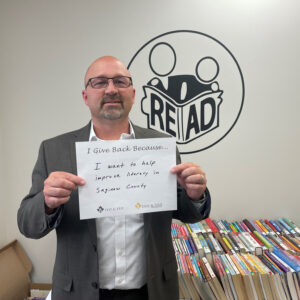 Today, they have mentorship programs where children meet with their mentors one-on-one and in groups to have lunch and discuss life skills, like how to tie a tie. They also have a nursing home program, where kids are transported to local nursing homes to read to the residents. There is a family literacy program where teachers help parents learn how to work with their children and improve their reading. Also, during COVID, the organization hosted book drives and dropped thousands of books off to kids who didn’t have access to libraries during the lockdown.
As a board member, finance committee chair, and an active volunteer with READ since 2008, it has been great to see how the organization has grown and adapted to the changing needs in our community. Saginaw County has truly embraced our organization and the work we do. We receive support and have partnered with many nonprofits in the area to make our programs possible. Seeing the Saginaw community come together to support our youth is inspiring, and I am proud to be a part of it.
I give back because I want to help improve literacy in Saginaw County.
Security Magazine wrote this week about the recent eye-opening SlashNext State of Phishing report. SlashNext analyzed billions of link-based URLs, attachments, and natural language messages in email, mobile and browser channels over six months in 2022 and found more than 255 million attacks —a 61% increase in the rate of phishing attacks compared to 2021.
The SlashNext State of Phishing Report for 2022 findings highlights that previous security strategies, including secure email gateways, firewalls, and proxy servers, are no longer stopping threats, especially as bad actors increasingly launch these attacks from trusted servers and business and personal messaging apps.
Key findings of the report include:
- Cybercriminals are moving their attacks to mobile and personal communication channels to reach employees. SlashNext recorded a 50% increase in attacks on mobile devices, with scams and credential theft at the top of the list of payloads.
- In 2022, they detected an 80% increase in threats from trusted services such as Microsoft, Amazon Web Services or Google, with nearly one-third (32%) of all threats now being hosted on trusted services.
- 54% of all threats detected in 2022 were zero-hour threats, showing how hackers are shifting tactics in real-time to improve success
- 76% of threats were targeted spear phishing credential harvesting attacks
- The top 3 attack sectors are Healthcare, Professional and Scientific Services, and Information Technology.
People are the most vulnerable part of an organization when it comes to phishing, scams, and fraud. They are also the most unprotected across all communication channels. For hackers, phishing is the most effective and far-ranging tool to perpetrate cybersecurity breaches, including lucrative ransomware and data theft.
Security Awareness Training showcases best practices for a company’s first line of defense – its employees – and teaches them the dangers of online threats. Learn more now.
Information in this article was provided by our partners at KnowBe4.
Because of the cost of unified communications (UC) and the opportunity for financial savings, using UC is a smart decision for most organizations. The reality is that switching to a cloud communications system and adopting UC costs less than using a traditional telephone system.
But before investing, you should research and perform a cost-benefit analysis for your business. That’s the only way you can assess the value that it can bring to your organization. You also want to know what strategies you can use to minimize costs and maximize benefits.
4 Ways to Save Money with Unified Communications
With a cloud-based unified communications solution, you can minimize your IT and operating costs, simplify your technology stack, and save on your phone bill. Here are the ways you can reduce costs when you invest in unified communications and clever ways to optimize those savings.
1. Lower Upfront Costs
With unified communications, you can use a cloud phone system, which means voice data transmits over the internet rather than phone lines. Instead of paying for all the hardware and maintenance costs of a traditional PBX phone system, you can get started with a mobile app downloaded onto your devices and a subscription licensing fee.
2. Fewer Communications Apps
Because you have voice, video conferencing, chat messaging, and file sharing all rolled up into one platform, you aren’t paying multiple vendors. This can lead to significant cost savings. One study found that using a single vendor results in a 56 percent lower total cost of ownership versus using a multi-vendor approach.
3. Smaller Phone Bill
You’ll also see lower costs with unified communications through a better rate per line and reduced long-distance calling costs. Businesses that use cloud phone systems save money each month on their phone bill.
4. Increased Productivity
When you empower your teams with user-friendly, full-featured software, they have the tools they need to work more efficiently. Additionally, with UCaaS, your staff can be productive from anywhere.
Your employees will be more productive and more satisfied with their job when they have technology that makes work more flexible and seamless. Your company will probably spend less on recruitment and training over time.
Optimize Your Unified Communications Costs by Choosing the Right Provider
Cloud communications is a popular business tool because businesses save money when they switch from their legacy phone systems. But you can optimize those savings if you choose the right cloud provider.
Learn more about YeoVoice powered by Elevate is a smart choice for businesses looking to adopt unified communications. Contact us today.
Information used in this article was provided by our partners at Intermedia.
Ransomware is scary. It’s where cybercriminals lock your data and charge you a ransom fee to get it back. If it happened to you, would you pay the fee?
Despite what the criminals promise, they don’t always unlock data when the ransom fee is paid. Or they ask for a second fee. Or they unlock it and then sell it on the dark web anyway.
According to Cybereason’s Ransomware: The True Cost to Business report, 73% of all organizations have experienced a ransomware attack in the last 12 months. And of those that were attacked, the question of whether the ransom was paid always comes up:
- 41% paid to “expedite recovery.”
- 28% paid to “avoid downtime.”
- 49% paid to “avoid a loss in revenue.”
But even after paying the ransom, 80% experienced a second attack, and 68% were asked for a higher ransom!
Many large companies are now refusing to pay, finding other ways to get their data back. And ransomware groups are looking for different opportunities. Small, financially stable businesses are the new targets. And the size of payments demanded has increased.
This means you and your team need to be vigilant about cybersecurity. Continue to take the necessary precautions, such as using a password manager, checking emails are legitimate, and making sure your network is being monitored and protected.
It’s also vital that you have a working backup of all data. Check it regularly.
Even without paying the ransom demand, your business stands to lose a lot of money if hit by ransomware. It takes ages and can cost a ton to get back on your feet.
If you want us to audit your business and check its ransomware resilience, get in touch.
Information used in this article was provided by our partners at MSP Marketing Edge.
A ton of information is available on how to stay cyber-safe. All the advice means well, but simply put, it all sounds the same after a while. Hover over links, verify who sent you the email, and don’t send $2k worth of gift cards to a recently departed relative you didn’t know existed.
While all of this is good advice, these are the more unconventional principles we believe can help anyone become more security savvy and perhaps a more successful individual overall.
Be Unpredictable
How many times have you seen a movie or video game where you have to sneak past a security patrol and managed it without breaking a sweat because the guards’ movements are entirely predictable?
Criminals need their targets to be predictable. Knowing how the victim will respond gives criminals the upper hand.
The best way to combat this is to be completely random. Reply to emails at odd hours. Sometimes answer your phone within three rings, and other times just let it go to voicemail to make a point.
Be Rude
One of the biggest traits criminals seek to leverage is our natural tendency to be polite and helpful.
If you see someone struggling to open the door because they are holding several cups of coffee, we will hold the door for them. If someone looks like they belong in the office, we will leave them be, even if they aren’t wearing a badge.
The best defense in these situations is to be rude. If someone you don’t recognize walks up to the door with two coffee cups, say you need to see ID before you can let them in. Who cares if they get annoyed?
Design Your Secure World
One reason we all fall into insecure habits is that security is often seen as a hurdle.
Think about what stops you or your colleagues from practicing good security, and design your world around it. You’ll be surprised how far a little peer pressure will take you.
If everyone starts locking their machine when walking away from it, all of a sudden, the new person will also start doing it – regardless of whether they fully understand why. After a while, that becomes part of your company culture.
Become an Informant
If you receive a strange email, forward it to your cybersecurity team. An unexpected SMS, pass that on to them. Found a USB on your desk, give it to security. They are the ones whose job it is to determine if something is truly bad or not.
What’s the worst that can happen? The security team will return your email or USB and say it wasn’t malicious but will thank you for your continued vigilance… and who doesn’t like to be thanked?
Looking for my cybersecurity tips? Check out Yeo & Yeo Technology’s blog.
Information used in this article was provided by our partners at KnowBe4.
2FA (two-factor authentication) should be a cybersecurity priority for every business. It’s no longer a nice-to-have — it could significantly reduce the risk of a security incident. When part of a robust and rigid set of cybersecurity protocols, it helps mitigate one of the biggest threats — unauthorized access via compromised passwords.
While 2FA isn’t new, the leaders in technology and applications, such as Microsoft and Google, now require it. The NIST (National Institute of Standards and Technology) password guidelines recommend it. Let’s dive into the world of 2FA to discern why it’s such an effective cybersecurity measure.
Compromised Passwords Are the Leading Reason for Hacking-Related Breaches
According to the 2022 Verizon Data Breach Investigations Report, 82 percent of breaches involved a human element, and 42 percent of those were credential-related. Unfortunately, users are the weakest link. You can deploy the most sophisticated layers of data security, encryption, enterprise-grade firewalls, and more. Still, they won’t stop hackers from gaining access to credentials.
By establishing a 2FA protocol, users need more than passwords to access applications. And you’ll need more than password guidelines that require “strong” ones to fortify your network against credential breaches.
NIST Digital Identity Guidelines Regarding 2FA
NIST password guidelines are for federal agencies. Private businesses can look to them as well as the gold standard. NIST recently revised its Digital Identity Guidelines to include the requirement of multi-factor authentication regarding securing any personal information available online.
To meet these guidelines, a user must demonstrate at least two of the following:
- Something you know (i.e., password)
- Something you have (i.e., device)
- Something you are (i.e., fingerprint)
How Secure Are Your Logins?
In looking at the landscape of 2FA, the more factors you employ for authentication, the better. NIST states that two factors currently meet the highest security requirements. However, that doesn’t mean you shouldn’t look to include more as you mature your security posture.
Yeo & Yeo Technology can support your cybersecurity efforts and keep you in the loop about emerging threats regarding passwords and access control threats. Contact us today to learn more about our managed cybersecurity solutions.
Information used in this article was provided by our partners at Intermedia.