Why Small Businesses Need to Prioritize Cybersecurity: Insider Threats paired with Copper Harbor Ale
Understanding the Threat: Insider Threats
Insider threats come from within your organization—employees, contractors, or partners who misuse their access to harm your business. These threats can be intentional (malicious) or unintentional (negligent), but both can lead to data loss, financial damage, and reputational harm.
Beer Profile: Copper Harbor Ale
Copper Harbor Ale is a classic amber ale with a rich, layered flavor profile from Midland Brewing Company. It looks familiar and trustworthy—just like an insider threat. Beneath its smooth exterior lies complexity, reminding us that not all threats come from the outside.
How to Protect Your Business
To reduce the risk of insider threats, businesses should:
- Implement role-based access controls and monitor user activity.
- Conduct background checks and enforce strong onboarding/offboarding processes.
- Foster a culture of transparency and accountability.
- Use data loss prevention (DLP) tools and insider threat detection software.
- Provide regular training on data handling and security policies.
Yeo & Yeo Technology helps businesses design secure systems and policies that protect against both external and internal risks.
Real-World Example: Michigan Medical Practice
In 2022, a disgruntled employee at a Michigan-based medical practice accessed and leaked patient records after being terminated. The breach led to HIPAA violations and costly legal consequences. Insider threats are often overlooked—until it’s too late.
Why It Matters
Small businesses often assume they’re too small to be targeted—but insider threats don’t discriminate. Yeo & Yeo Technology’s cybersecurity and business consulting services are designed to help organizations of all sizes build secure, scalable systems.
Complimentary IT Consult
Are you concerned about who has access to your data? Our free IT Consultation includes a review of access controls, insider threat exposure, and policy effectiveness.
Understanding the Threat: Phishing
Phishing is one of the most common and deceptive cyber threats. It involves fraudulent emails or messages that appear to come from trusted sources, tricking recipients into revealing sensitive information like passwords, financial data, or login credentials. These attacks are often the gateway to larger breaches and ransomware infections.
Beer Profile: Dam Good Beer (American Blonde Ale)
Dam Good Beer is a light, easy-drinking American blonde ale brewed locally at Midland Brewing Company. Phishing is deceptively simple and easy to overlook, just like the blonde ale. It’s light, approachable, and seems harmless at first glance, but it can catch you off guard if you’re not paying attention. This pairing reflects the subtlety and widespread nature of phishing attacks.
How to Protect Your Business
To defend against phishing attacks, businesses should:
- Train employees to spot suspicious emails and links.
- Use email filtering and anti-phishing software.
- Implement multi-factor authentication (MFA) across all systems.
- Regularly test staff with simulated phishing campaigns.
- Report and respond quickly to suspected phishing attempts.
Yeo & Yeo Technology’s cybersecurity team helps Michigan businesses build a culture of awareness and resilience through training, simulations, and advanced email security tools.
Real-World Example: Traverse City School District
In 2023, a phishing scam targeted the Traverse City Area Public Schools, tricking staff into transferring over $100,000 to a fraudulent account. The attack exploited trust and timing—two key ingredients in successful phishing campaigns.
Why It Matters
Phishing is a low-cost, high-reward tactic for cybercriminals—and it’s not going away. Yeo & Yeo Technology has been helping Michigan businesses stay ahead of evolving threats for over 40 years. Our business consulting services include cybersecurity, managed IT, VoIP, AI integration, and software development.
Complimentary IT Consult
Are you unsure how well your team can spot a phishing attempt? Yeo & Yeo Technology offers a free IT Consultation to evaluate your email security, employee readiness, and overall risk posture.
Understanding the Threat: Malware
Malware is a broad category of malicious software designed to damage, disrupt, or gain unauthorized access to systems. It includes viruses, worms, spyware, and ransomware. Malware can enter through email attachments, compromised websites, or unpatched software, and it often operates silently until significant damage is done.
Beer Profile: Boom Run Oatmeal Stout
Malware is complex, layered, and can linger, just like Midland Brewing Company’s Boom Run Oatmeal Stout, which has deep notes of dark chocolate, vanilla, and coffee. It’s rich and dark, much like the hidden payloads and persistence mechanisms of sophisticated malware strains.
How to Protect Your Business
Regular cybersecurity audits are essential to identifying vulnerabilities before attackers do. Businesses should:
- Conduct internal and external vulnerability assessments.
- Review access controls and user permissions.
- Monitor network traffic for anomalies.
- Ensure antivirus and anti-malware tools are up to date.
- Evaluate third-party vendor security practices.
Yeo & Yeo Technology’s cybersecurity team conducts thorough audits and assessments to help Michigan businesses strengthen their defenses and maintain compliance.
Real-World Example: Small Business Impact
According to the 2024 State of Ransomware Report, ransomware attacks nearly doubled in 2023, with small and mid-sized businesses among the hardest hit. Many of these businesses lacked regular cybersecurity audits, leaving them exposed to malware that crippled operations and leaked sensitive data.
Why It Matters
Malware can cripple operations and compromise sensitive data. Regular audits are your first line of defense. Yeo & Yeo Technology’s business consulting services go beyond cybersecurity—we offer managed IT, VoIP, AI solutions, and custom software development to help your business thrive securely in a digital world.
Complimentary IT Consult
Not sure where your vulnerabilities lie? Yeo & Yeo Technology offers a free IT Consult to help you uncover hidden risks and strengthen your defenses. This includes:
- A full review of your IT infrastructure
- Threat detection and response readiness
- Employee training evaluation
- Actionable recommendations from our cybersecurity professionals
Understanding the Threat: Ransomware
Ransomware is one of the most devastating cyber threats facing businesses today. It infiltrates your systems, encrypts your data, and demands a ransom for its release. These attacks can halt operations, compromise sensitive information, and cost businesses thousands—if not millions—of dollars.
Beer Profile: Oktoberfest
Oktoberfest is a perfect fall lager for the season. Ransomware is a classic, high-impact threat, just like Oktoberfest, a classic, bold seasonal beer, locally crafted from Midland Brewing Company. An Oktoberfest lager’s rich maltiness and traditional roots mirror ransomware’s deeply entrenched and evolving nature. It’s not subtle; when it hits, it dominates the experience—just like this beer.
How to Protect Your Business
To defend against ransomware, businesses should:
- Implement regular data backups and test recovery procedures.
- Train employees to recognize phishing emails and suspicious links.
- Keep software and systems updated with the latest security patches.
- Use endpoint protection and network monitoring tools.
- Develop and test an incident response plan.
Yeo & Yeo Technology’s cybersecurity specialists help Michigan businesses build layered defenses against ransomware through managed IT services, employee training, and proactive threat monitoring.
Real-World Example: Flagstar Bank
Even large, well-resourced organizations are not immune. In 2021, Michigan-based Flagstar Bank paid a $1 million bitcoin ransom to cybercriminals after sensitive customer data was exposed in a ransomware attack. The breach highlighted the importance of proactive cybersecurity and rapid incident response planning.
Why It Matters
Ransomware doesn’t discriminate—it targets businesses of all sizes. With over 40 years of service, Yeo & Yeo Technology is committed to helping Michigan companies stay secure. Our team provides comprehensive business consulting services, including cybersecurity, managed IT, VoIP, AI integration, and software development.
Complimentary IT Consult
Want to know how vulnerable your business is to ransomware? Yeo & Yeo Technology offers a complimentary IT Consult to help you identify gaps in your current security posture. This assessment includes:
- A review of your network and endpoint security
- Evaluation of backup and recovery protocols
- Employee awareness and phishing risk analysis
- Recommendations tailored to your business size and industry
It’s a no-obligation way to gain clarity and confidence in your cybersecurity strategy.
A Fresh Take on Cybersecurity
Cyber threats are constantly evolving, and so should the way we talk about them. That’s why Yeo & Yeo Technology is excited to introduce a new blog series that pairs five of today’s most pressing cyber threats with five distinct craft beers from Midland Brewing—bringing a fun, engaging twist to understanding the risks.
About Midland Brewing Company
We are excited to partner with Midland Brewing Company, a proud locally owned establishment that has been serving the Great Lakes Bay Region with passion and craftsmanship. With a legacy rooted in Michigan’s rich brewing history, they offer a welcoming atmosphere and a lineup of beers that reflect the spirit of our community.
The 5 Cyber Threats We’ll Explore
Here are the five cyber threats we’ll be exploring in the series:
- Ransomware – A stealthy and costly threat that can lock down your data and operations.
- Malware – Malicious software that can infiltrate systems, steal data, or cause widespread damage.
- Phishing – Deceptive emails and messages designed to trick users into revealing sensitive information.
- Data Breaches – Incidents where confidential information is accessed or disclosed without authorization.
- Insider Threats – Risks from within your organization, often from trusted employees or partners.
Why This Matters for Your Business
Whether you’re a business owner, IT leader, or simply a fan of great beer, this series is for you. Yeo & Yeo Technology is more than just a cybersecurity partner—we’re a full-service business consulting firm offering managed IT, cybersecurity, VoIP solutions, AI integration, and custom software development. Our team is dedicated to helping Michigan businesses thrive in a digital world.
This webinar has concluded. You can watch the webinar on-demand here.
What if Microsoft 365 could do more than just help you work — what if it could work for you?
Copilot, Microsoft’s AI-powered assistant built into apps like Outlook, Excel, and Teams, is transforming how businesses operate. Now, with Copilot agents, you can take that automation a step further.
In this 30-minute webinar, watch Copilot agents come to life in real time and learn how these powerful tools can help automate repetitive tasks, streamline processes, and save you hours of manual work.
You’ll gain insight into:
- What Copilot agents are and how they work
- The real benefits for small and mid-sized businesses
- How to create agents using your own rules and data
- Practical use cases to start automating today
See two agents built live and watch them in action, with demos and practical insights you can use immediately.
Please join us!
Presenter:
Adam Seitz is a Software Consultant at Yeo & Yeo Technology, where he helps clients overcome unique business challenges through innovative software solutions, including custom programming and AI. With specialized knowledge in the Microsoft Office environment, Adam has guided numerous clients in developing automation tools that streamline workflows and boost efficiency.
Artificial intelligence might be the buzzword of the decade, but for many business leaders, it still feels like science fiction. Even the name Microsoft Copilot sounds like something out of a futuristic movie. Is it a robot? A tool? A person? Is it secure? Is it worth the hype?
Let’s remove the confusion and get down to the essentials. In this article we’ll explain what Copilot is, how it works inside Microsoft 365, and, most importantly, what it can do to make your business run smoother, faster, and smarter.
What is Microsoft Copilot?
At its core, Microsoft Copilot is an AI assistant built into the Microsoft 365 apps you use every day, Word, Excel, Outlook, Teams, PowerPoint, and more.
Think of it as your digital coworker. It’s not replacing your team. It’s helping them move faster by taking care of repetitive or time-consuming tasks.
Here’s what that might look like:
- In Word, Copilot can draft entire reports, marketing blurbs, or summaries from a few bullet points.
- In Excel, it can analyze data sets and highlight trends in seconds.
- In Outlook, it can summarize long email threads and suggest quick replies.
- In Teams, it can recap meetings you missed and extract action items.
And the best part? It all happens inside the apps you’re already using. No new interfaces. No new software to learn.
What Makes It So Powerful?
What sets Copilot apart from basic automation tools is that it uses large language models (LLMs), the same kind of artificial intelligence that powers tools like ChatGPT.
That means if it’s been set up securely, it can understand your questions in plain English and respond with natural, helpful suggestions based on your company’s data.
So instead of: “Open Excel. Find the revenue tab. Calculate quarter-over-quarter growth…”
You can just say: “What’s the revenue growth from Q1 to Q2 for our Northeast region?”
And Copilot will find the answer for you. That’s the magic.
Why Should Businesses Care?
Let’s talk business value.
AI is no longer optional; it’s a competitive advantage. Companies that embrace Copilot early are:
- Saving time: Automating meeting notes, email replies, report writing, and more.
- Making better decisions: Extracting insights from data without a data science degree.
- Boosting productivity: Giving employees tools that cut manual work significantly.
- Attracting talent: Empowering teams with modern tools that reflect today’s workplace.
The companies that wait? They’re losing hours, if not weeks, on tasks that Copilot can do in minutes.
Is It Complicated to Use?
Not at all. Once you have the proper licensing and enable Copilot in your Microsoft environment (we can help!), the AI assistant becomes embedded directly in your apps. You don’t need to be an AI expert. If you can write an email, you can use Copilot.
Is It Safe?
When properly configured, yes. Copilot respects your Microsoft security settings. That means employees only see data they’re already allowed to access. However, AI governance is essential. You’ll need to review data permissions and train your team to use Copilot responsibly, especially in highly regulated industries.
What Should You Do Next?
The most important thing you can do now is understand the potential. Even if you’re not ready to roll it out today, learning what Copilot can do will help you plan strategically for the future. That’s why we’re hosting a live demo:
You’re Invited: Live Webinar
Title: How to Build Copilot Agents to Automate Your Business
Date: Tuesday, September 9, 2025
Time: 11:00 – 11:30 a.m. EST
Hosted by Yeo & Yeo Technology
See what Copilot looks like in action. We’ll walk you through real use cases and even show you how to build your own “Copilot Agent” live. It’s only 30 minutes, and it could change how you work forever.
👉 Register now to reserve your seat
Final Thought
AI is no longer just for tech giants, it’s for everyone. Microsoft Copilot puts powerful AI tools in the hands of every employee, making it easier than ever to write smarter, analyze faster, and work better. So don’t be intimidated. Get curious. And take the first step toward a more efficient future.
Why Setting Boundaries for Copilot Could Save Your Business from a Costly Mistake
Imagine this:
A junior employee at your company opens Microsoft Teams and is trying to get caught up on a project. They ask Copilot, “What’s the latest on the merger negotiations?” To their surprise and horror, it pulls up internal financial spreadsheets, drafts executive compensation packages, and confidential board discussions—all available instantly, copyable, and shareable.
That’s not a scene from a thriller. That’s a real situation that happened to a mid-sized business. And it could happen to you. The culprit? Lack of AI governance.
AI Is Smart; But It’s Not Infallible
Microsoft Copilot can do amazing things. But it doesn’t “know” what’s sensitive and what’s not. It simply has access to what the user can access, according to your Microsoft 365 permissions structure. If your data permissions are loose, or your Microsoft environment isn’t cleaned up, Copilot won’t know the difference between a client memo and your company’s 10-year financial forecast.
That’s why AI governance isn’t optional. It’s essential.
What is AI Governance?
Think of AI governance as setting the guardrails. It’s the combination of:
- Data access control (who can see what)
- User training (how to ask Copilot thoughtful, safe questions)
- Privacy and compliance policies (what data Copilot is allowed to use)
- Monitoring and auditing (tracking how AI is being used across your company)
Without this foundation, turning on Copilot is like giving everyone in your company a key to every filing cabinet, hoping they don’t open the wrong drawer.
A Real-World Scenario (That You Don’t Want to Replicate)
In the story above, here’s what went wrong:
- The user had broad access to company-wide Teams channels and SharePoint folders—many of which were rarely used or outdated.
- Copilot scanned all accessible content to answer the employee’s question, pulling confidential documents from several years ago.
- No alerts were in place, and the employee unknowingly shared the sensitive data in a broader meeting chat.
This led to legal reviews, internal investigations, and a near-loss of client trust. And the worst part? It was all preventable.
5 AI Governance Steps to Take Before Turning on Copilot
- Audit your data access
Review who can access what across Teams, SharePoint, OneDrive, and Exchange. - Clean up outdated files and folders
Eliminate sensitive legacy data that doesn’t need to be indexed or searched. - Create Copilot usage policies
Define what kinds of questions are appropriate to ask and what’s off-limits. - Train your team
Ensure your employees understand both the power and the risk of Copilot. - Partner with an expert
Yeo & Yeo Technology can help configure your Microsoft 365 environment with safe, strategic AI enablement.
Want to See Governance Done Right?
We’re hosting a free 30-minute webinar to walk through real use cases and show you how Copilot Agents are built.
Live Webinar: How to Build Copilot Agents to Automate Your Business
Tuesday, September 9, 2025
11:00 – 11:30 a.m. EST
Hosted by Yeo & Yeo Technology
We’ll show you exactly how businesses use Copilot without compromising their data. Learn how to streamline processes and stay secure.
Final Word
Turning on Copilot without governance is like giving a sports car to an unlicensed driver. Sure, it might go fast, but the crash could be costly. Get your AI foundation right. Protect your data. And empower your team with confidence.
Artificial intelligence isn’t coming. It’s already here, and businesses that have embraced tools like Microsoft Copilot are seeing faster workflows, smarter insights, and happier employees.
We get it. AI can seem abstract. But the results are very real. In this blog, we’ll walk you through 10 specific ways companies already use Copilot today to simplify operations, save time, and boost productivity. These examples might tip the scales if you’re still on the fence.
What Copilot Does Best
Microsoft Copilot works inside your existing Microsoft 365 apps, Word, Excel, PowerPoint, Outlook, Teams, and more. It acts like a smart digital assistant, using AI to perform time-consuming or manual tasks, freeing your team to focus on higher-value work.
It’s not about replacing your people. It’s about amplifying their capabilities. Here are 10 ways real businesses, including some of our clients, are using Copilot right now:
1. Auto-Drafting Emails
Sales and support teams use Copilot in Outlook to draft personalized customer responses based on previous threads, attachments, and internal documents.
Time saved: 10–15 minutes per email
2. Summarizing Meetings
Busy executives who miss a Teams call can ask Copilot to provide a complete meeting summary, decisions, action items, and even the tone of the conversation.
Result: No more rewatching 45-minute recordings.
3. Financial Data Analysis
Finance teams use Copilot in Excel to detect budget anomalies, compare year-over-year revenue, and generate pivot tables from raw data in seconds.
Insight: No formulas needed.
4. Creating Client Presentations
Marketing teams prompt Copilot in PowerPoint to build presentations using content from sales decks, case studies, and reports.
AI benefit: It auto-suggests layouts, charts, and speaker notes.
5. HR Policy Drafting
HR departments generate onboarding materials, benefits FAQs, and employee communications using Copilot in Word and then tailor them by department.
Consistency + customization = win-win.
6. Project Recaps
Project managers can ask Copilot to summarize status updates from Teams channels, shared docs, and OneNote pages and produce a one-page report.
Everyone stays aligned, even across time zones.
7. Job Description Generation
Need to post a new role? Copilot can draft job descriptions based on department goals, required skills, and examples from other postings.
Speed: From draft to publish in under 10 minutes.
8. Client Proposals
Business development teams use Copilot to auto-populate proposals based on client meeting notes, past project templates, and internal pricing models.
From intake to pitch in record time.
9. Inbox Triage
Executives can ask Copilot to sort and prioritize their inbox, identify urgent messages, and suggest one-click replies for common questions.
Your email: streamlined.
10. Internal Knowledge Retrieval
Employees can ask Copilot to locate relevant documents, past project summaries, or internal procedures, saving time spent searching SharePoint.
Never dig through folders again.
Real Impact, Measurable Results
Across departments, Copilot saves teams hours per week, reduces mental fatigue, and improves collaboration speed. Microsoft reports that early adopters see up to a 50% productivity boost in some workflows. It’s not about working harder. It’s about working smarter, with the right tools.
Want to See Copilot in Action?
We’re showing you exactly how Copilot Agents work, live.
Live Webinar: How to Build Copilot Agents to Automate Your Business
Tuesday, September 9
11:00 – 11:30 a.m. EST
Hosted by Yeo & Yeo Technology
During the session, we’ll build a real Copilot Agent and show how it automates tasks across departments. Don’t miss this chance to learn what’s possible and what’s next.
If you’ve purchased Copilot, or are seriously considering it, you might be wondering: Now what?
Many businesses are excited about AI but unsure how to turn it on, configure it safely, and begin seeing results. And that’s understandable. Copilot is powerful, but launching it without a plan can lead to confusion, underuse, or even risk. Good news: Getting started doesn’t have to be overwhelming.
In this post, we provide a practical, non-technical guide to setting up Copilot in your business, from licensing to rollout to early wins.
Step 1: Make Sure You’re Licensed
Before anything else, ensure your business has the correct Microsoft 365 license. To access Microsoft Copilot, you need:
- Microsoft 365 E3 or E5, or Business Standard/Premium, and
- A Copilot add-on license (which is purchased separately)
Need help verifying this? Yeo & Yeo Technology can walk you through licensing requirements and help you avoid overpaying or misconfiguring your environment.
Step 2: Assess Your Data and Access
Copilot’s strength lies in its ability to access company data to generate intelligent responses. However, data access needs to be clean and intentional. Before you enable it:
- Audit who can access what in Teams, SharePoint, OneDrive, and Outlook.
- Identify outdated or overly permissive sharing settings.
- Decide which groups or departments should get Copilot first.
- Pro tip: Clean up first, then turn on. Not the other way around.
Step 3: Train Your Team
Copilot is only as effective as the people using it. We recommend launching with short internal training sessions that cover:
- How to use Copilot inside each Microsoft app
- What kinds of questions to ask
- How to review and edit AI-generated content
- What not to do (e.g., don’t share sensitive content generated from Copilot externally)
- Yeo & Yeo Technology provides both live and on-demand training sessions tailored to your team.
Step 4: Start with a Pilot Group
Don’t roll it out to your whole company at once. Instead, start with a pilot group from different departments, such as HR, finance, marketing, and operations. Why? Because you’ll:
- Get feedback on usability and access issues
- Collect real examples of how Copilot improves workflows
- Build internal “Copilot champions” to support broader adoption
- These pilot users will help identify the most valuable use cases to scale across your organization.
Step 5: Track Results and Refine
Once Copilot is live, don’t “set it and forget it.” Build a simple feedback loop:
- What’s working?
- Where are users getting stuck?
- Are there security or governance questions that need to be addressed?
Gathering these insights early will help you roll it out more effectively across the company, and get greater ROI from your AI investment.
Bonus: Start with Easy Wins
Here are a few simple, high-impact tasks to introduce Copilot:
- Drafting customer follow-up emails in Outlook
- Summarizing last week’s meetings in Teams
- Creating a sales pitch deck from a case study in PowerPoint
- Analyzing monthly revenue numbers in Excel
- Drafting job descriptions in Word
These use cases show value quickly and help build confidence across your team.
Want a Live Demo?
You’re invited to a 30-minute live webinar where we’ll walk through real-world use cases and even build a Copilot Agent live.
Live Webinar: How to Build Copilot Agents to Automate Your Business
Tuesday, September 9
11:00 – 11:30 a.m. EST
Hosted by Yeo & Yeo Technology
Whether you’re just getting started or already testing Copilot, this session will show you how to use it to reduce manual work and automate key processes.
Final Thought
Copilot isn’t just for tech-savvy companies; it’s for any business that wants to save time, reduce repetitive tasks, and empower their teams. The sooner you start, the sooner you benefit. If you’re unsure how to take that first step, we’re here to help you launch safely, securely, and strategically.
How to Use AI to Eliminate Repetitive Work, Save Time, and Boost Productivity Across the Business
Most people think of Microsoft Copilot as a handy writing or summarizing tool. That’s a great start, but it’s only scratching the surface. The next level of AI in the workplace is here, and it’s called a Copilot Agent.
These digital assistants don’t just answer questions; they perform tasks, follow multi-step instructions, and can even support your departments like a real team member would. Imagine automating a 10-step invoice approval process. Or onboarding a new hire. Or prepping weekly sales reports without lifting a finger. A Copilot Agent can do that, and businesses that embrace them now are setting themselves up for a major productivity leap.
What Is a Copilot Agent?
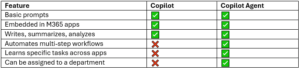
A Copilot Agent is like a supercharged version of Copilot that’s built to handle automated, repeatable workflows. It goes beyond simple prompts. It’s designed to:
- Collect and analyze information from different sources
- Take action based on defined rules
- Communicate with your apps, documents, and systems
- Deliver outcomes without human intervention
Think of it as a trained digital assistant that follows instructions consistently, 24/7—without ever needing a coffee break.
What’s the Difference Between Copilot and a Copilot Agent?
Examples of Copilot Agents in the Wild
Here are just a few use cases showing how departments can benefit from Copilot Agents:
1. Finance & Accounting: Invoice Approver Agent
- Monitors inbox for incoming invoices
- Matches invoice to PO and project code
- Sends approval requests to managers
- Logs approved payments into the accounting system
Result: Faster payment cycles, fewer human errors
2. HR: New Hire Onboarding Agent
- Sends welcome email + login info
- Shares employee handbook and benefits forms
- Schedules first-week meetings
- Notifies IT to set up equipment
Result: A consistent, stress-free onboarding experience for every new hire
3. Sales: Weekly Pipeline Reporting Agent
- Pulls data from CRM and Excel sheets
- Summarizes open deals and forecasts
- Prepares a PowerPoint deck
- Sends it to the sales team every Friday
Result: No more end-of-week scramble
4. Operations: Vendor Management Agent
- Tracks contract expiration dates
- Sends reminders to procurement
- Flags compliance risks
- Suggests renewal options based on usage
Result: Better vendor control and fewer missed deadlines
Are They Safe?
Yes, if configured correctly. Copilot Agents operate within the security boundaries of your Microsoft 365 environment. That means they only access what you’ve given them permission to access. Still, governance is key:
- Set up proper data access controls
- Review what agents can and can’t do
- Monitor performance and update regularly
Yeo & Yeo Technology’s specialists help ensure that every Copilot Agent is configured securely and aligned with your business needs.
How Do You Build One?
Watch our on-demand webinar on how to design and build your first Copilot Agent. This video explains the business logic, the Microsoft 365 tools you need, and how to scale agents across your departments.
Final Thoughts
Copilot is great, but Copilot Agents are transformative. They give your business the power to reduce manual work, improve consistency, and help every department operate more efficiently. It’s not just about automation. It’s about giving your team the freedom to focus on what they do best, while the digital assistants handle the rest.
Big changes are coming for nonprofits using Microsoft 365.
As of July 1, 2025, Microsoft will no longer offer free grant licenses for Microsoft 365 Business Premium and Office 365 E1. If your nonprofit is relying on these tools, now is the time to act. Without a transition plan in place, you could face serious disruptions in how your organization communicates, protects sensitive data, and manages daily operations.
The Changes
Under Microsoft’s updated nonprofit licensing program:
- Business Premium and Office 365 E1 will no longer be free through nonprofit grants.
- Nonprofits can either:
- Switch to Microsoft 365 Business Basic (free for up to 300 users)
- Purchase discounted Business Premium or E1 licenses (up to 75% off retail)
If your organization currently uses these free licenses, they will remain active until your next renewal date, but a change is mandatory after that.
And while “free” might sound appealing, the real cost of downgrading could be your nonprofit’s security, compliance, and operational efficiency.
Six Key Differences Hitting Nonprofits
If your nonprofit manages donor information, financial records, or member health data, here is why a move to Business Basic might leave you exposed:
1. Email Security
- Business Premium: Includes Microsoft Defender for Office 365 to block phishing, malicious links, and unsafe attachments.
- Business Basic: Limited to standard spam filters.
- Why it matters: Phishing remains the top cause of breaches, especially in nonprofits.
2. Device Management
- Business Premium: Comes with Microsoft Intune to secure and manage devices, and even remotely wipe lost phones.
- Business Basic: Offers almost no device control.
- Why it matters: Staff using personal devices can open the door to serious security threats.
3. Threat Detection & Response
- Business Premium: Includes Microsoft Defender for Business for real-time detection and remediation.
- Business Basic: Lacks these capabilities entirely.
- Why it matters: Without Defender, you might not know you’ve been attacked until it’s too late.
4. Information Protection & Encryption
- Business Premium: Automates data classification and encryption with Azure Information Protection.
- Business Basic: Manual and error-prone.
- Why it matters: Automation reduces the risk of accidental data exposure.
5. Identity and Access Management
- Business Premium: Advanced identity controls via Azure AD Premium.
- Business Basic: Limited to basic MFA.
- Why it matters: Prevent unauthorized access with rules like blocking logins from unknown locations.
6. Compliance & Auditing Tools
- Business Premium: Includes tools like Data Loss Prevention (DLP) and Compliance Manager.
- Business Basic: Offers limited auditing.
- Why it matters: Nonprofits subject to audits or regulatory oversight need to prove compliance.
What Nonprofits Need to Do Now
Don’t wait for your renewal date to scramble for a solution. Here’s how to stay secure, compliant, and cost-effective.
1. Assess Your Current Licensing
Microsoft does not inform partners about your licensing status. Start by reviewing which users have Premium licenses and what tools they’re using. Need help? We can guide you through it.
2. Avoid a Full Downgrade
Not every user needs Premium, but some definitely do. Consider a hybrid approach: use Business Basic for general users, and Business Premium for staff handling sensitive data or working remotely.
3. Build a Strategic Plan
Yeo & Yeo Technology can help your nonprofit build a cost-effective strategy that protects what matters most — your mission and your people. We’ll help you mix and match license types, integrate necessary security tools, and plan a smooth rollout.
Make a Smooth Transition
This licensing change doesn’t have to derail your operations or your mission. With the right plan, you can maintain productivity, reduce risk, and stay within budget.
Contact our team for a free consultation. We’ll assess your Microsoft licensing, identify vulnerabilities, and create a roadmap that works for your organization.
Don’t let a licensing change create a security gap.
Partner with Yeo & Yeo Technology and protect your nonprofit with confidence.
When it comes to cybersecurity and IT health, patching is non-negotiable. But without a consistent policy, patch management can quickly become disorganized, reactive, and risky.
A patch management policy helps ensure your systems are protected, up-to-date, and compliant, without burdening your IT staff. Here’s what your organization needs to know to get patching right.
What Is Patch Management?
Patch management is the process of identifying, acquiring, testing, and installing software updates—or patches—to fix security vulnerabilities, bugs, and performance issues. These updates apply to everything from operating systems and applications to firmware and drivers.
Patching is critical because:
- Cybercriminals exploit unpatched vulnerabilities
- Compliance frameworks often require patching within specific timeframes
- Delayed patches can cause system instability and compatibility problems
A patch management policy ensures consistent processes and accountability. Instead of patching only after something breaks, you patch proactively to avoid problems before they start.
A well-written policy should cover:
- Scope
Define which systems, software, and devices are included. Be specific about endpoints, servers, mobile devices, and third-party applications. - Patch Sources and Verification
Specify where patches come from (e.g., Microsoft, vendors, trusted repositories), and how they are verified to avoid rogue updates. - Testing Procedures
Before deploying patches organization-wide, test them in a sandbox or non-production environment. This helps prevent compatibility issues or unexpected system crashes. - Deployment Schedule
Decide how often you apply patches. Critical security patches need to be applied as they are released, and routine patches should be applied daily or weekly. - Roles and Responsibilities
Clarify who is responsible for tracking, approving, testing, and deploying patches. - Rollback and Recovery
Have a documented plan for reverting changes if a patch causes problems. Include backup procedures and timeframes. - Reporting and Documentation
Keep records of patch deployment status, issues encountered, and successful updates. This helps meet audit requirements and provides visibility to leadership.
Best Practices
- Automate where possible to reduce manual effort and human error.
- Prioritize high-risk vulnerabilities.
- Communicate patch schedules and expected downtimes with users.
- Integrate patch management into your broader cybersecurity strategy.
Getting It Right with a Trusted IT Partner
If you don’t have internal resources to manage patching effectively, working with an IT provider can help you build a strong policy and automate patching across your environment. The right partner will help you stay secure, compliant, and ahead of issues, without creating more work for your team.
In today’s threat landscape, an intentional patch management policy isn’t optional. It’s a key part of a proactive IT strategy. Ready to get started? Contact us today.
Technology is a vital part of any growing business, but managing every IT task manually can waste time, open the door to human error, and overwhelm already-busy teams. Below are the most impactful IT tasks to automate for businesses that want scalable, smart solutions.
- Software Updates and Patch Management
Keeping systems up to date is critical, but managing patches manually across dozens or hundreds of machines is inefficient and risky. Automating patch management ensures systems receive timely updates without requiring hands-on oversight. This improves security posture, keeps compliance efforts on track, and reduces downtime from preventable issues. - Device Monitoring and Alerts
Automated monitoring tools can scan devices 24/7 for performance issues, hardware failures, or unusual behavior. Automated alerts notify your IT team instantly when something falls out of threshold, such as high CPU usage or a disconnected backup. This means quicker response times and fewer surprises. - Backup Management
Automation ensures that backups run consistently and reliably. You can schedule backups to run at low-traffic times, verify backup completion automatically, and receive alerts if something fails. This removes the manual burden from IT staff and gives leadership peace of mind knowing that data is protected. - User Provisioning and Deprovisioning
Creating new user accounts—or disabling old ones—can be time-consuming and error-prone. Automating this process based on role or department helps reduce human error, ensures new employees have the right access from day one, and revokes access promptly when staff exit. - Security Scans and Antivirus Management
Routine antivirus scans and updates are crucial but easy to overlook. Automating security scans and virus definition updates helps maintain consistent protection. You can also automate remediation actions, like isolating infected devices or rolling back changes. - Software Deployment
Whether rolling out a new app or updating an existing tool, automating deployment means updates reach users faster and more consistently. This minimizes downtime, eliminates version mismatches, and improves the user experience. - Routine Maintenance Tasks
Disk cleanups, log reviews, defragmentation, and other system maintenance can all be scheduled to run during off-hours. This keeps systems performing optimally with minimal disruption to users.
How to Get Started
Start with a technology assessment to identify what your team is doing manually and where inefficiencies exist. Then, prioritize repetitive tasks that are prone to error or critical to uptime and security. From there:
- Choose tools or platforms that align with your existing infrastructure.
- Work with a managed service provider to implement automation without overburdening internal IT.
- Train staff to monitor and manage automated workflows for maximum ROI.
Automation isn’t about replacing your IT team. It’s about freeing them up to focus on more strategic work. For growing organizations, automating these seven tasks is a smart way to reduce risk, increase efficiency, and scale your operations without scaling your headcount.
IT often gets put on the back burner until something breaks. A system goes down, an account gets hacked, or an employee can’t log in. Then, it’s a scramble to fix the issue and determine the next step.
That reactive approach is common, but it’s also expensive—not just in terms of service calls and downtime but also in missed opportunities and decisions made under pressure. That’s where a strategic IT advisor comes in.
The Role of a Strategic IT Advisor
Unlike traditional IT support, a strategic advisor looks ahead. They align your technology with your business goals, help you plan for growth, and ensure you’re not constantly playing catch-up. Think of it as having a tech-savvy business partner who understands how IT decisions affect operations, budgets, and productivity.
Comparing IT Support Options
Most businesses fall into one of three IT support categories. Here’s how they compare:
Good: Break/Fix IT Provider
This is the traditional approach. Call when something’s broken, get it patched up, and move on. There’s no big-picture planning, just quick fixes. It’s reactive and often leads to higher long-term costs.
Better: IT Support Contract
Support contracts offer ongoing help with basic needs like device setup and password resets. You might get faster response times and fewer emergencies, but the approach is still largely reactive.
Best: Strategic IT Advisor
A strategic advisor brings a long-term mindset. They ask questions like, “Where do you want to be in a year?” and “What’s slowing your team down?” Then, they build a plan to align your technology with your goals. It’s IT support with strategy baked in.
Smarter Spending, Fewer Surprises
Many businesses feel like IT costs are unpredictable. A server goes down, software becomes outdated, or someone chooses the wrong tool. The result is unplanned spending, lost time, and frustration.
A strategic advisor brings order to the chaos. Planning purchases, reviewing options, and phasing in upgrades help control costs and avoid expensive mistakes. You spend when it matters—on tools that offer value, efficiency, or better security, not just when something fails.
Growth Without the IT Bottlenecks
When your business grows, your IT must scale with it. A strategic advisor plans for that growth before it creates problems. Whether adding users, expanding locations, or updating workflows, your advisor ensures the right infrastructure is in place.
They also help you move faster. Instead of searching for answers or juggling vendors, you have a trusted partner who understands your business and can guide decisions quickly and clearly.
The Bottom Line
IT should support your business, not slow it down. A strategic advisor helps make that happen by planning ahead, reducing risk, and making smart, informed decisions about where to invest.
At Yeo & Yeo Technology, we believe IT should be an asset, not a liability. That’s why we work with our clients as advisors, not just technicians. We help you think long-term, spend wisely, and keep your systems working as hard as you do.
Contact us to learn more about our approach and how we can help.
Information used in this article was provided by our partners at MSP Marketing Edge.
Password spraying is a stealthy cyberattack technique that slips past many standard security defenses. Unlike traditional brute-force attacks, which bombard a single account with endless password guesses, password spraying flips the script—attackers use one common password and try it across many user accounts.
Hackers often gather lists of usernames from public directories or previously leaked data. Then, they pair those usernames with a shortlist of frequently used passwords—like “Welcome1” or “Spring2025”—and systematically test them across multiple accounts. This method is typically automated, allowing attackers to quickly attempt thousands of login combinations.
These attacks often fly under the radar because only one password is tested per account at a time. They don’t trigger lockouts or raise immediate alarms, making them harder to spot but potentially just as dangerous, especially if they’re not detected early.
How Can You Prevent and Detect Password Spraying?
Stopping password spraying requires both proactive monitoring and smart policy enforcement. Here’s how organizations can reduce their risk:
1. Enforce Strong Password Policies
Encourage employees to use long, complex passwords and rotate them regularly. A password manager can help users create and store secure credentials without remembering them all.
2. Require Multi-Factor Authentication (MFA)
Even if a password is compromised, MFA adds another layer of protection. It’s one of the most effective defenses against unauthorized access.
3. Conduct Regular Security Audits
Review login logs, authentication protocols, and endpoint security regularly. These audits help spot anomalies and strengthen weak points before attackers can exploit them.
Additional Steps to Strengthen Security
Beyond the basics, a few more advanced tactics can help:
1. Improve Login Attempt Monitoring
Set up alerts for patterns like multiple login attempts to different accounts from the same IP address in a short time. These signs can indicate an active spraying campaign.
2. Educate Employees
Ensure users know the risks of reusing passwords and the importance of using MFA. Regular awareness training can go a long way in preventing avoidable breaches.
3. Create a Robust Incident Response Plan
If an attack occurs, a fast response is key. Ensure your plan includes communication protocols, password reset procedures, and post-incident reviews to prevent future attacks.
Secure Your Organization
Password spraying is a quiet, often unnoticed tactic—but its impact can be severe. By putting the right safeguards in place now, you can prevent small security gaps from becoming major breaches.
Need help evaluating your cybersecurity posture or deploying better defenses? Yeo & Yeo Technology can help you stay ahead of evolving threats. Contact us to learn how we can tailor solutions to protect your business from password spraying and other advanced cyberattacks.
Article used with permission from The Technology Press.
Do we need cyber insurance?
It’s a good safety net, especially if you handle sensitive data. But please remember that it’s not a replacement for good security practices.
Is storing files in the cloud safe?
Yes, if it’s a trusted provider and you use strong security settings like multi-factor authentication. If you want advice on the best cloud solution for your business, get in touch.
How often should we review our IT security?
Continuous monitoring with tools like Security Information and Event Management (SIEM) is essential, but regular reviews of patches, vulnerabilities, and backups are also key. We can help you set a review schedule tailored to your business and risk level. Contact Yeo & Yeo Technology.
Information used in this article was provided by our partners at MSP Marketing Edge.
Broadcom’s new VMware strategy is disrupting the virtualization landscape, and small to mid-sized businesses are feeling the impact.
Broadcom has dramatically increased license costs for smaller customers and ended thousands of trusted reseller relationships, signaling that VMware is now an enterprise platform. For many companies, this disruption has left them looking for VMware alternatives.
Licensing and Pricing Changes
In early 2025, Broadcom introduced the new VMware licensing model that included an increase from a 16-core to a 72-core minimum for license purchases. Even if your infrastructure only uses 16 cores, you must now pay for 72, raising your annual support costs from around $2,000 to over $10,000.
Broadcom also made other key changes affecting its small customer base:
- Subscription-Only Model: Perpetual licenses are gone. All VMware products now require ongoing subscriptions.
- Bundled Offerings: Customers must now buy bundled suites, often paying for features they don’t need.
- Late Renewal Penalties: If you miss a renewal, you will be hit with a 20% penalty, and in some cases, cease-and-desist letters for lapsed licenses.
Partner Program: “Cleaning House”
Broadcom has also cut the “Registered” tier of its VMware partner program, ending its relationship with thousands of smaller resellers with just 60 days’ notice. The focus is now on Select, Premier, and Pinnacle partners—those with deep enterprise investments and VMware Cloud Foundation (VCF) ability.
For many companies, this means:
- Losing trusted local IT partners
- Being forced to work with larger, and many times more expensive and less accessible providers
- Facing longer support wait times and higher support costs
What Does This Mean?
Broadcom hopes to optimize its $69 billion investment in VMware by focusing on its top 600 enterprise customers and quickly phasing out smaller partners and customers.
For many companies, VMware is no longer a workable long-term solution due to fewer support options, higher costs, limited access to VMware solutions, and reduced flexibility.
What Can You Do?
You have options, and Yeo & Yeo Technology is here to help you find the best choice.
1. Cloud Migration (Azure, AWS, etc.)
Public cloud platforms offer scalable, secure virtualization without the hardware burden, making them ideal for remote teams or seasonal workloads.
2. Hybrid Infrastructure
Keep critical workloads on-prem while shifting others to the cloud. This approach offers flexibility, cost savings, and future-readiness.
3. Hyperconverged Infrastructure (HCI)
Solutions like Scale Computing combine computing, storage, and networking into one system at a lower total cost and include all the virtualization licensing.
Market Disruption
Many businesses are already starting to migrate away from VMware to other solutions. Scale Computing has experienced record growth since the Broadcom acquisition. Others are adopting hybrid solutions using Microsoft’s Hyper-V. Many are moving to Azure or AWS. For less complex infrastructures, the M365 platform offers a viable replacement utilizing Teams, SharePoint, and OneDrive. The important lesson is that you need to start planning now.
This VMware disruption puts many companies in a challenging position, but waiting is not the answer. Whether you’re exploring cloud, Hyperconvergence, or a hybrid solution, the time to act is now. The transition from VMware to a new solution takes prior planning and involves a complex migration.
Yeo & Yeo Technology is ready to help you navigate this transition. Our team has deep expertise in VMware alternatives, including Azure, Scale Computing, and hybrid environments. Let’s build a roadmap that protects your business and positions you for growth. Contact us today to get started.
Have you ever stopped to think about how much your business relies on AI already?
AI is quietly becoming part of everyday work life, from smart tools that help with emails or customer support to apps that analyze trends or boost productivity.
But with great power comes great responsibility.
Using AI isn’t just about getting tasks done faster. It’s about making smart, ethical choices that protect your people, your customers, and your reputation. That means being clear on how AI is being used in your business. And making sure it’s being used the right way.
Responsible AI starts with understanding.
Not everyone on your team needs to be a tech expert, but they should know the basics, like how to protect data, share sensitive information, and spot when something seems wrong. Good training is key, especially as AI becomes more involved in decision-making.
It also means thinking about fairness and accountability. If an AI tool is helping to make decisions — perhaps sorting resumes or recommending products — you need to be confident it’s not introducing bias or making errors. Someone in your business should always be responsible for double-checking its work. AI can assist, but it shouldn’t replace human judgment.
Creating simple, clear guidelines for your team is a great place to start.
Here are a few tips to help you get started:
- Define acceptable use: Outline what types of AI tools can be used in your business, and for what purposes. Be specific about tools approved for sensitive tasks.
- Prioritize data ethics: Include rules about inputting customer or employee data into AI systems. Emphasize the importance of data security and confidentiality.
- Review outputs critically: Encourage employees to question AI-generated results. Make “trust but verify” your mantra.
- Assign ownership: Designate who in your business is responsible for monitoring AI use, updating tools, and flagging concerns.
- Stay transparent: Let clients or customers know when AI is part of your processes, especially if it affects their experience or data.
- Educate regularly: AI evolves fast. Commit to ongoing training so your team stays informed about the benefits and risks.
Done well, AI can give your business a real edge. But only if it’s used thoughtfully, transparently, and with care. If you want to explore how AI can help your business (and how to manage it responsibly), we’d love to help. Get in touch.
Information used in this article was provided by our partners at MSP Marketing Edge.
Email is one of the most powerful business tools, but it’s also one of the most common sources of security breaches, miscommunication, and productivity loss. From overlooked messages to accidental data leaks, bad email habits can quietly undermine your team’s efficiency and leave your organization exposed to cyber threats.
Here’s what to watch for — and how to fix it.
1. Disorganized, Overflowing Inboxes
A cluttered inbox can be overwhelming, and when important messages get buried, productivity takes a hit. Employees may miss deadlines, overlook tasks, or respond too late — all because they can’t find what they need quickly.
The fix: Treat your inbox like a workspace, not a junk drawer. Use folders and filters, delete what you don’t need, and archive old emails regularly. Consider setting aside a few minutes daily to clean up and organize.
2. Clicking Without Thinking
Phishing attacks are often disguised as legitimate messages — invoices, password resets, or internal communications. One click on a malicious link can lead to stolen data, ransomware infections, or compromised accounts.
The fix: Always hover over links before clicking to preview the URL. Be wary of urgent messages, requests for sensitive information, or emails with unexpected attachments. If something feels off, verify the sender through another communication method.
3. Relying on Email for Everything
Email isn’t always the right communication tool — yet many people default to it for tasks better suited for other platforms. Long threads, real-time decisions, or shared file editing can quickly become chaotic when handled via email.
The fix: Consider when it makes more sense to switch to a chat platform, project management tool, or file-sharing system. Clear, intentional communication improves collaboration and avoids confusion.
4. Ignoring Spam Filters and Reporting
Too many employees ignore suspicious messages instead of reporting them, or worse, interact with them. Over time, this weakens an organization’s ability to prevent future attacks.
The fix: Encourage everyone to report phishing attempts and other suspicious emails. IT teams can then act and adjust filters to reduce future threats. Regular reviews of spam filtering settings are also essential to catch evolving tactics.
5. Overusing “Reply All”
It might seem harmless, but replying to everyone on an email chain when it’s not necessary can lead to inbox overload, missed action items, or the accidental sharing of sensitive information.
The fix: Use “Reply All” only when your message is relevant to every recipient. Before hitting send, double-check who’s included in the conversation and whether your response is needed.
6. Weak or Reused Passwords
Are you still using your birthday or “password123”? Weak passwords are a major reason email accounts get hacked. Reusing passwords across multiple accounts increases the damage a single breach can cause.
The fix: Use long, unique passwords for each account and update them regularly. Consider using a password manager to keep track. Wherever possible, enable multi-factor authentication (MFA) to add an extra layer of protection.
7. No Email Backup or Retention Plan
Email is a repository for critical business information, contracts, decisions, and documentation. However, many businesses don’t have a plan for backing up or recovering email data in the event of an outage or security incident.
The fix: Establish policies around email retention and backups. Ensure your organization can quickly recover email data if needed, whether due to accidental deletion, hardware failure, or cyberattack.
Better Email Habits Start with Awareness
Bad email habits might seem minor, but they can lead to costly downtime, reputational damage, and even compliance violations. With the right support and tools in place, your organization can turn email from a risk into a reliable, efficient asset.
At Yeo & Yeo Technology, we help organizations modernize their email systems, improve security awareness, and integrate productivity tools that reduce risk and boost performance. Whether you’re looking to train your team, tighten your security, or upgrade your systems, we’re ready to help.