Checklist: How to Tell if Your Workspace Setup is Ergonomic
New ways of working have given way to a new normal for employees in all industries. And many are realizing that once-temporary setups (and habits) need to change to revitalize their workdays. Checking emails on the couch, leading a virtual call hunched over a laptop at the kitchen table, or even working back at your corporate office in a shared workspace can leave you uncomfortable, tired, and uninspired.
No matter where you work, your workspace should fuel a productive workday and even a new sense of energy. Our checklist will help you assess your current setup and identify ways to improve the ergonomics to work more vibrantly.
To regain feel-good energy during your workday, ensure you and your workspace—temporary or permanent—follow this checklist:
√ Your screen height is at eye level.
For the most comfortable viewing, keep your monitor at or slightly below eye level and about arm’s length away. Avoid looking down or up at your screen to help protect your neck.
√ Your feet are flat on the floor.
When your feet rest naturally on the floor, you support your body’s neutral posture. Dangling feet can lead to lower back pain, so if needed, invest in a simple footstool for the extra height.
√ Your chair is adjustable.
Ditch the kitchen chair for an ergonomic chair that offers multiple adjustment points. The right chair height is key to many items on this checklist, and other adjustments can provide a personalized fit that bolsters your overall well-being.
√ Your arms are at a 90-degree angle.
This is another important element of neutral posture. Your elbows should stay close to your core, and your arms should be at a 90-degree angle when working at your computer. Wrists should always stay flat as you type.
√ You use a drop-down keyboard.
Your keyboard height should be roughly the same height as your elbows. That means most work surfaces are too high to be considered ergonomic (especially laptops). Purchase an add-on, back-tilt keyboard tray that sits below your work surface.
√ Your main items are in the primary zone.
Take an inventory of all desk items, including your mouse, printer, notebooks, and files. Keep your most used items closest in your primary zone, followed by less commonly used items in your secondary and tertiary zones. That will help prevent unintended tweaks to your neck and back (and help you stay organized).
Design a Vibrant Workspace
Remote work has directly impacted wellness and engagement. Check out our ergonomic solutions and build an ergonomic workspace that inspires your best work and fuels a collaborative team spirit.
Information used in this article was provided by our partners at Ergotron.
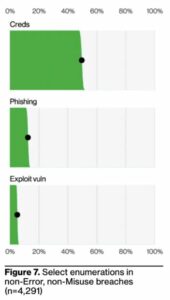
People are one of the most common factors contributing to successful data breaches. This year’s newly-released Data Breach Investigations Report outlines the three primary ways attackers gain initial access to an organization: credentials, phishing, and exploitation of vulnerabilities.
In the figure below, it’s evident that the first two are the primary problem:
Source: Verizon
According to the report, approximately 90% of initial access involves social engineering and people. Putting this together, it becomes evident that social engineering is used primarily to obtain credentials from a victim that has no idea they are being scammed.
Security Awareness Training is key in helping to reduce the likelihood of users falling for social engineering scams – whether in email, on the web, in a text, etc. – designed to harvest credentials (or any other malicious outcome). Interested in learning more about our security awareness training solutions? Contact Yeo & Yeo Technology.
Information used in this article was provided by our partners at KnowBe4.
Social engineering is the art of manipulating, influencing, or deceiving someone into taking an action that isn’t in their best interest or the best interest of their organization. The goal of social engineers is to obtain your trust, then exploit that relationship to coax you into either divulging sensitive information or giving them access to your network. The best social engineers use your emotions to create a sense of urgency, and their attacks can be very convincing.
Social engineering incidents have almost doubled since last year to account for 17% of all breaches, according to Verizon’s 2023 Data Breach Investigations Report (DBIR), which analyzed more than 16,312 security incidents, of which 5,199 were confirmed data breaches.
Among these attacks, BEC, or business email compromise, has become more popular. In this attack, the perpetrator uses existing email communications and information to deceive the recipient into completing a seemingly ordinary task, like changing a vendor’s bank account details. But what makes this attack dangerous is that the new bank account provided belongs to the attacker. As a result, any payments the recipient makes to that account will simply disappear.
It can be difficult to spot these attacks as the attackers do a lot of preparation beforehand. They may create a domain doppelganger that looks almost identical to the real one and modify the signature block to show their own number instead of the vendor’s.
Attackers can make subtle changes to trick their targets, especially if they receive similar legitimate requests. This could be one reason BEC attacks have nearly doubled and now make up over 50% of incidents in this category.
Timely detection and response are crucial when dealing with social engineering attacks, as well as most other attacks. The median cost of BECs now averages around $50,000, emphasizing the significance of quick detection. The cost of ransomware attacks has also doubled since last year, reaching the million-dollar range.

The evidence points to a gaping need for organizations to get in control of the security basics — or else face a spiraling cycle of inflation for data breach costs. Security solutions provide solid coverage for most social engineering attacks. Still, for that small percentage of attacks that make it to the user, it’s only Security Awareness Training that will be the difference between a protected organization and an enabled attack.
Information used in this article was provided by our partners at KnowBe4.
As businesses grow and adapt to a more modern and digital world, the use of cloud-based phone systems is becoming increasingly popular. A cloud business phone system provides numerous benefits to a business, such as scalability, cost-effectiveness, and mobility. In addition to traditional phone features like voicemail, call forwarding, and call recording, many cloud business phone systems now offer integrated video conferencing, team chat, and file-sharing capabilities. In this blog, we will explore a day in the life of a cloud business phone system at a typical business that uses these features.
8:00 AM: As employees arrive at the office, they log in to their desk phones or softphones on their computers, which are connected to the cloud business phone system. The phone system greets them with a welcome message and provides access to all the features they need, including video conferencing and team chat. This allows employees to collaborate and communicate with each other in real-time, even if they’re in different locations.
9:00 AM: The receptionist receives the first incoming call of the day. The cloud business phone system’s auto-attendant feature greets the caller and directs them to the appropriate department or extension. If the receptionist is unavailable, the call is automatically forwarded to the next available employee or their voicemail. If the caller needs to share a file with the employee they are speaking with, the cloud business phone system’s file-sharing capabilities allow the employee to access the file quickly and easily.
10:00 AM: The sales team is making outbound calls to potential customers using the cloud business phone system’s softphone feature. This allows them to call from their computer rather than tying up their desk phone. The softphone also allows them to transfer calls and access all the same features as their desk phone. If a potential customer wants a video call, the cloud business phone system’s video conferencing feature allows the sales team to connect with the customer face-to-face, no matter where they are.
12:00 PM: During lunchtime, employees can use the cloud business phone system’s mobile app to make and receive calls on their personal mobile devices. This ensures that they don’t miss any important calls while they’re away from their desk. The mobile app also allows employees to access team chat and file-management features, so they can stay connected with their colleagues even when they’re out of the office.
2:00 PM: A customer calls in with a billing inquiry. The cloud business phone system’s call recording feature allows the customer service representative to review their previous interactions with the customer and quickly resolve their issue. The representative can also share a file with the customer to help explain the billing issue.
4:00 PM: As the workday winds down, employees can access voicemail through the cloud business phone system’s web interface or email notifications. They can listen to their messages, respond, and delete them as necessary. If they need to share a file with a colleague, they can do so easily through the cloud business phone system’s file management capabilities.
5:00 PM: As employees log out for the day, the cloud business phone system’s call-forwarding feature ensures that all calls are forwarded to the appropriate employee or voicemail box. The system also automatically sends voicemails to employees’ email inboxes for easy access.
A cloud business phone system with integrated video conferencing, team chat, and file management capabilities is an essential tool for businesses. It provides employees the flexibility and mobility they need to be productive while allowing them to collaborate and communicate with their colleagues in real-time. Whether employees are in the office, working from home, or on the go, a cloud business phone system ensures they can always stay connected to each other and their customers. Learn more about Yeo & Yeo Technology’s cloud-based business phone systems today!
Information used in this article was provided by our partners at Intermedia.
IT asset discovery is the process of locating, identifying, and indexing all assets within an organization’s IT infrastructure. This includes both hardware and software assets, such as laptops, tablets, PCs, servers, IoT devices, software libraries, third-party software licenses, code repositories, storage buckets, databases-as-a-service (DBaaS), containers, virtualized network devices, and virtual servers.
The benefits of IT asset discovery
Asset discovery is a critical component of any cybersecurity strategy and provides organizations with a new level of transparency in their networks. Asset discovery can help your organization:
- Improve cybersecurity: By having an accurate inventory of assets, organizations can ensure that all assets are up-to-date and secure, helping to protect the organization from potential cyber threats.
- Remain compliant: Knowing which assets the organization owns can help them determine the best ways to use them and ensure they comply with security and regulatory standards.
- Cut costs and budget better: Knowing which devices you have, their usage, and how old they are can help you make more informed decisions regarding IT budgeting and planning. In addition, IT asset discovery can help organize third-party software licenses, so you aren’t paying for additional, unused software instances.
In short, asset discovery helps organizations better understand their environment and take steps to protect and improve it.
Tips on choosing the right asset discovery tool
- Choose a tool that tells the full story and allows you to easily identify, scan, and monitor all devices.
- Ensure your chosen platform handles automated patching.
- Check that your chosen platform supports the hardware you’re currently using.
Ready to get started with IT asset discovery?
With the right tools and processes in place, you can quickly identify and address any potential risks, reduce costs, and improve the efficiency of your IT operations. As you continue to learn more about asset discovery, remember that it is an ongoing process that requires regular maintenance and updates to remain effective. Yeo & Yeo Technology can help.
Information used in this article was provided by our partners at ConnectWise.
In a recent report, data security service Cyberhaven detected and blocked requests to input data into ChatGPT from 4.2% of the 1.6 million workers at its client companies because of the risk of leaking confidential information, client data, source code, or regulated information.
“Employees are submitting sensitive business data and privacy-protected information to large language models (LLMs) such as ChatGPT, raising concerns that artificial intelligence (AI) services could be incorporating the data into their models and that information could be retrieved at a later date if proper data security isn’t in place for the service,” said Robert Lemos at DARKReading.
“In one case, an executive cut and pasted the firm’s 2023 strategy document into ChatGPT and asked it to create a PowerPoint deck. In another case, a doctor input his patient’s name and medical condition and asked ChatGPT to craft a letter to the patient’s insurance company. And as more employees use ChatGPT and other AI-based services as productivity tools, the risk will grow.”
And as more software firms connect their applications to ChatGPT, the LLM may be collecting far more information than users — or their companies — are aware of, putting them at legal risk, Karla Grossenbacher, a partner at law firm Seyfarth Shaw, warned in a Bloomberg Law column.
“Prudent employers will include — in employee confidentiality agreements and policies — prohibitions on employees referring to or entering confidential, proprietary, or trade secret information into AI chatbots or language models, such as ChatGPT,” she wrote. “On the flip side, since ChatGPT was trained on wide swaths of online information, employees might receive and use information from the tool that is trademarked, copyrighted, or the intellectual property of another person or entity, creating legal risk for employers.”
Some companies are taking action to protect themselves and their employees. JPMorgan restricted workers’ use of ChatGPT. In addition, Amazon, Microsoft, and Walmart have all issued warnings to employees to take care when using generative AI services.
To maintain the security of sensitive information in the face of advancing technology, organizations must review existing policies and procedures and equip employees with the necessary knowledge and training. Security awareness training can be a valuable starting point to ensure employees know the risks of sharing information with AI software. With the right measures in place, organizations can make the most of their new technologies while keeping their data safe and secure.
Information used in this article was provided by our partners at KnowBe4.
A major change to your IT infrastructure shouldn’t be planned in a hurry. If you’re starting to think about ending it with your current systems and bringing your business into the future, there’s plenty to consider. You need to define everything you’d like the upgrade to achieve. And think beyond solving the immediate problem to what your ideal solution could deliver. But where do you start?
Here are some tips we have for those planning an IT overhaul.
Keep it simple and document everything
It’s quite common for businesses to want to over-customize their infrastructure. Many businesses really do need something fully bespoke. Others end up with a setup that’s far too complex because they want to shoe-horn a new system into a familiar way of doing things. Often, the latest solutions offer surprising productivity benefits – but you may need to be prepared to flex how you work to get the best out of them.
Use this opportunity to embed logical process improvements. And document everything. This will help save time and resources as you work through any teething issues, and it can form the basis of staff training.
Research, research, research
Finding the right solution can be overwhelming. This is where expert advice and contacts in your network come in. Listen to recommendations and speak to an IT professional with broad expertise.
- How well is the software supported and routinely updated?
- How easily does it integrate with other solutions?
- Is there an alternative option that you haven’t even considered?
Many software solutions offer a free trial period. This allows you to see how it works in practice but will also give you a good idea of the support and communication you’ll receive before making a long-term commitment. Because if you do find that a solution doesn’t do everything you’d hoped, you’ll start to introduce those clunky workarounds again and eventually end up back at square one.
Plan your data migration
If you’re switching from an old system to a new one, plan how to transfer your existing data – it’s usually not a simple export/import. Make sure your backups are intact and have an emergency rollback plan to quickly get back to where you were and keep working if an implementation doesn’t go smoothly.
Have an implementation and training plan
Have training sessions with your new applications, and make sure everyone understands why the change is happening. It’s common for people to be resistant to new ways of working. You could have a trainer come to your premises or use online sessions via video call or interactive training courses.
Choose the right professionals from the get-go
Whether you know exactly what you need or you don’t know where to start, the right professionals will support you all the way. A professional who does this daily won’t see this as the daunting prospect it might feel like to you. They’ll foresee issues before they arise and take the weight of responsibility off your shoulders.
Look for a provider who’s done this before with similar-sized businesses. Someone who’ll take the time to understand the level of customization and personalization required and will think about your overall needs. And find somebody you like.
Get in touch
If you’re considering any IT project and want to speak to a professional, talk to us first. We specialize in many areas and work across a range of different solutions. Get in touch today.
Information used in this article was provided by our partners at MSP Marketing Edge.
I’ve deleted an important file – can I get it back?
If you’ve checked your recycle bin and it’s not there, don’t panic. If you have a working backup, your file should be recoverable. Just don’t do anything else… call an expert (we can help).
Why do I keep losing connection to the office Wi-Fi?
It may be that your router is overloaded. Restart your device and try again. If that doesn’t work, try connecting on another device – this should tell you if it’s a device or router issue.
I’ve noticed a new Admin account appear on my network. How did that happen?
If no one in the business has created this account, you may have an intruder in your network. Contact your IT support to investigate it immediately.
Information used in this article was provided by our partners at MSP Marketing Edge.
According to Armorblox’s 2023 Email Security Threat Report, the financial services industry as a target has increased by 72% over 2022 and was the single largest target of financial fraud attacks, representing 49% of all such attacks. When breaking down the specific types of financial fraud, it doesn’t get any better for the financial industry:
- 51% of invoice fraud attacks targeted the financial services industry
- 42% of payroll fraud attacks
- 63% of payment fraud
To make matters worse, nearly one-quarter (22%) of financial fraud attacks successfully bypassed native email security controls, according to Armorblox. That means 1 in 5 email-based attacks made it all the way to the inbox.
Here are some ways you can boost your cybersecurity resilience and prevent cyberattacks:
- Prepare for phishing attempts, and don’t click on suspicious links. Malicious links can come from anywhere — instant messenger apps, email, forum posts, etc. Never click links you don’t need to click or that you didn’t expect to receive, and consider implementing security awareness training to help your employees recognize financial fraud and other phishing-based threats, stopping them before they do actual damage.
- Use a VPN while working with business data. Whether you connect to remote company sources and services, or if your work doesn’t require those activities and you just need to browse some web resources and use telecommunication tools, use a Virtual Private Network (VPN). VPNs encrypt all your traffic, making it secure against attackers who may attempt to capture your data in transit.
- Keep your passwords and your working space to yourself. Ensure that your passwords — and your employees’ passwords — are strong and private. Never share passwords with anyone. Use different and long passwords for every service. Where possible, use multi-factor authentication for an extra layer of security.
In conclusion, the financial services industry has witnessed a significant 72% increase in financial fraud phishing attacks. To enhance cybersecurity resilience and safeguard against these threats, organizations should prioritize measures like security awareness training, VPN usage, and strong password practices. Learn more about Yeo & Yeo Technology’s cybersecurity solutions or contact us today.
Information in this article was provided by our partners at KnowBe4.
The eSentire Threat Response Unit recently discovered a scamming activity conducted via a fake QuickBooks installer. The infection typically starts when a user searches for “QuickBooks download” on Google, and the first search result leads them to a malicious website hosting a fake QuickBooks installer.
Affected users reported being unable to access one of their QuickBooks files and, upon opening the file, received a warning message instructing them to call a phone number that appeared to be from Intuit Technical Support. However, the number was part of a scam. When victims called the number, the malicious actor would offer to sell the service to “repair” the files for $800 to $2,000. The malicious actor claimed to be from “QB Exclusive” and used ZoHo Assist (remote support software) to achieve the remote session on the victim’s machine.
How can you prevent this cyberattack?
- Before downloading QuickBooks, check that the software is coming from a legitimate installer. Legitimate QuickBooks installer certificates are issued to Intuit, Inc.
- Note that the legitimate QuickBooks files are located under C:\Users\Public\Public Documents\Intuit\QuickBooks\ by default. Any files located under a different folder are suspicious.
- If you receive a pop-up, think before taking any action. Always be suspicious of urgent messages or those asking for immediate payment in return for product support.
For more information on this QuickBooks scam, refer to the full eSentire article.
The 3-2-1 backup rule is a widely accepted set of best practices for data backup and restoration based on the idea that an organization should use three copies of its data stored in two different formats, with one copy stored off-site.
The rule is designed to keep data safe from any potential disaster, whether a malicious attack, system failure, or physical disaster. It’s also designed to ensure the organization can recover its data quickly and efficiently in an emergency.
Incorporating redundancy into an organization’s overall backup strategy, the 3-2-1 rule helps minimize the risk of complete data loss. It ensures that businesses can continue to operate and scale even in the face of disaster.
How to store your backups
As attitudes, practices, and solutions surrounding data storage have evolved over the years, so too have the technologies used to store backups. Today, backup and disaster recovery isn’t just a theoretical concept — it’s an essential function critical to business operations.
Organizations, from SMBs to large enterprises, have various options, from cloud storage to physical media and everything in between. Many opt for a hybrid approach that combines both physical and cloud storage solutions, which can include using both an on-site and off-site storage facility, as well as a cloud-based backup solution.
When considering backup solutions, consider the following criteria:
- Cost:The cost of storing backups can add up quickly, so it’s important to consider the total cost of ownership (TCO) when selecting a storage solution.
- Accessibility:Accessing backups in a timely manner is essential to any backup strategy. It’s important to consider the potential latency when selecting a storage solution and whether it will meet the organization’s accessibility needs.
- Security:Data security is of paramount importance when it comes to backups. Select a storage solution that offers encryption and other security measures to ensure that backups remain secure.
How often should you backup
Backing up data regularly is essential to a successful backup strategy. How often an organization should back up its data will depend on the type of data it stores, the frequency of changes, and its tolerance for data loss.
In general, it’s recommended that organizations backup their data daily. This ensures that the most up-to-date version of the data is available in case of emergency and minimizes the chances of data loss or corruption. Some organizations may also consider creating weekly or monthly backups to store archived copies of their data.
Other best practices for data backup
While the 3-2-1 rule provides a comprehensive starting point for a backup and disaster recovery strategy, there are additional best practices that organizations can use to ensure that data is secure:
- Automate backups:Automating backups can help ensure that data is backed up regularly and reduce the risk of data loss or corruption.
- Ensure that backups are encrypted: Encrypting backups is an essential step in protecting data. It’s important to ensure that backups are stored using industry-standard encryption protocols and that proper key management is in place.
- Monitor backups:Regularly monitoring backups can help ensure that the backup process runs smoothly and that data is backed up correctly.
- Invest in a reliable off-site backup provider: Having a reliable, secure, and cost-effective off-site backup provider is essential to any good data recovery strategy.
Conclusion
The 3-2-1 backup rule is a widely accepted set of best practices for data backup and restoration. Incorporating redundancy into an organization’s overall backup strategy, the 3-2-1 rule helps minimize the risk of complete data loss. It ensures that businesses can continue to operate and scale even in the face of disaster. Organizations should consider automation, encryption, and monitoring of their backups to further protect their data and should invest in a reliable off-site backup provider to ensure that their data is securely stored. Looking to implement a data backup solution? Contact Yeo & Yeo Technology.
Information in this article was provided by our partners at ConnectWise.
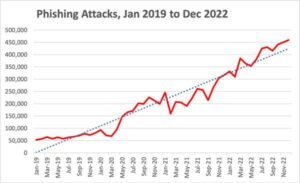
The latest Phishing Activity Trends Report from the Anti-Phishing Working Group (APWG) shows an unrelenting upward trend in phishing attacks per quarter. According to the report:
- The number of unique email subjects increased by 99.2%, totaling over 250,000 in Q4
- The number of brands impersonated decreased slightly by 4% to 1780
- The number of unique phishing websites increased slightly by 6% to just over 1.3 million
In essence, it appears that more unique campaigns are the answer – after all, there are only so many brands that have a broad appeal. It is interesting to see that the number of phishing websites is not increasing with the unique email subjects. However, the “unique” email subjects may simply be variations on a theme aimed at using the same phishing website to capture credentials, banking details, etc.
The scarier part of this report is that 150% continual growth.
Source: APWG
This growth is a mix of new threat actors getting into the game, the increase of “as a service” cyberattacks, and the fact that successful attacks are also increasing in numbers.
Organizations need to prevent these attacks before they truly start. And with the seemingly never-ending growth in phishing, implementing Security Awareness Training is becoming increasingly important. If you’re ready to start building your human firewall, contact us today.
Information in this article was provided by our partners at KnowBe4.
New data shows how likely it is for your organization to succumb to a ransomware attack, whether you can recover your data, and what’s inhibiting a proper security posture.
According to CyberEdge’s Cyberthreat Defense Report, in 2023:
- 7% of organizations were victims of a ransomware attack
- 7% of those paid a ransom
- 73% were able to recover data
- Only 21.6% experienced solely the encryption of data and no other form of extortion
Nearly 78% of victim organizations experienced one or more additional forms of extortion (CyberEdge mentions threatening to release data publicly, notifying customers or media, and committing a DDoS attack as examples of additional threats mentioned by respondents).
IT decision-makers were asked to rate on a scale of 1-5 (5 being the highest) the top inhibitors of establishing and maintaining an adequate defense. The greatest inhibitor (with an average rank of 3.66) was a need for more skilled personnel.
In second place, with an average ranking of 3.63, is low-security awareness among employees – something only addressed by creating a proper security culture with Security Awareness Training at the center.
These findings underscore the urgency for organizations to prioritize cybersecurity measures and invest in enhancing their defenses against ransomware attacks. If you have any questions or concerns about cybersecurity, please do not hesitate to contact us. Our team of professionals is here to help you safeguard your systems and data.
Information in this article was provided by our partners at KnowBe4.
Cybersecurity professionals continue to warn that advanced chatbots like ChatGPT are making it easier for cybercriminals to craft phishing emails with pristine spelling and grammar, the Guardian reports.
Corey Thomas, CEO of Rapid7, stated, “Every hacker can now use AI that deals with misspellings and poor grammar. The idea that you can rely on looking for bad grammar or spelling to spot a phishing attack is no longer the case. We used to say that you could identify phishing attacks because the emails look a certain way. That no longer works.”
The Guardian points to a recent report by Europol outlining the potential malicious uses of AI technology.
“In Europol’s advisory report, the organization highlighted a similar set of potential problems caused by the rise of AI chatbots, including fraud and social engineering, disinformation and cybercrime,” the Guardian says. “The systems are also useful for walking would-be criminals through the steps required to harm others, it said. ‘The possibility to use the model to provide specific steps by asking contextual questions means it is significantly easier for malicious actors to better understand and subsequently carry out various types of crime.’”
Max Heinemeyer, Chief Product Officer at Darktrace, said AI technology would be particularly useful for spear phishing emails.
“Even if somebody said, ‘don’t worry about ChatGPT, it’s going to be commercialized,’ well, the genie is out of the bottle,” Heinemeyer said. “This type of technology is being used for better and more scalable social engineering. AI allows you to craft very believable ‘spear-phishing’ emails and other written communication with very little effort, especially compared to what you had to do before.”
Heinemeyer added, “I can just crawl your social media and put it to GPT, and it creates a super-believable tailored email. Even if I’m not knowledgeable of the English language, I can craft something indistinguishable from a human.”
Security awareness training can help your employees keep up with evolving social engineering tactics and detect advanced phishing attacks. Learn more about the value of security awareness training in our Phishing by Industry Benchmarking Report.
Information in this article was provided by our partners at KnowBe4.
Compromised websites (legitimate sites that have been successfully compromised to support social engineering) are serving visitors fake Google Chrome update error messages.
“Google Chrome users who use the browser regularly should be wary of a new attack campaign that distributes malware by posing as a Google Chrome update error message,” Trend Micro warns. “The attack campaign has been operational since February 2023 and has a large impact area.”
The message displayed reads, “UPDATE EXCEPTION. An error occurred in Chrome automatic update. Please install the update package manually later, or wait for the next automatic update.” A link is provided at the bottom of the bogus error message that takes the user to what’s misrepresented as a link that will support a Chrome manual update. In fact, the link will download a ZIP file that contains an EXE file. The payload is a cryptojacking Monero miner.
A cryptojacker is bad enough since it will drain power and degrade device performance. This one also carries the potential for compromising sensitive information, particularly credentials, and serving as staging for further attacks.
This campaign may be more effective for its routine, innocent look. There are no spectacular threats, no promises of instant wealth, just a notice about a failed update.
Users can become desensitized to the potential risks bogus messages concerning IT issues carry with them. Informed users are your last line of defense against attacks like these. New school security awareness training can help any organization sustain that line of defense and create a strong security culture.
Information in this article was provided by our partners at KnowBe4.
Cybersecurity is not just a technological challenge but increasingly a social and behavioral one. No matter their tech savviness, people are often duped by social engineering scams, like CEO fraud, because of their familiarity and immediacy factors.
Bad actors have the know-how to tap into the “mental shortcuts” called cognitive biases and manipulate employees into compromising sensitive information or systems. Here are the top cognitive biases hackers use the most:
- Hyperbolic Discounting: Choosing immediate rewards over rewards that come later.
Example: Free coupon or special deal scams - Habit: The tendency of users to follow recurring habits.
Example: Phishing emails delivered at a specific time of day - Recency Effect: Remembering the most recently presented information or events best.
Example: Phishing attacks referencing current events - Halo Effect: When positive impressions of a person, company, etc., influence your overall feeling of that person or company.
Example: Scam messages from well-known brands - Loss Aversion: The tendency to prefer avoiding losses to acquiring equivalent gains.
Example: Phishing attacks threatening credit score damage - Ostrich Effect: Avoiding unpleasant information (hiding your head in the sand).
Example: Phishing emails warning action should be taken quickly, or else - Authority Bias: Attributing greater accuracy to the opinion of an authoritative figure.
Example: Hackers spoofing important messages from the CEO - Optimism Bias: Overestimating the probability of positive events while underestimating the probability of adverse events.
Example: Phishing emails will offer fake job opportunities or insider information - Curiosity Effect: Acting to resolve curiosity even if it could lead to negative consequences.
Example: Phishing attacks offering limited-time offers or secret information
A comprehensive security awareness training program can help employees understand these behaviors and spot social engineering attacks. Contact us to learn more.
Information used in this article was provided by our partners at KnowBe4.
According to Statista, an estimated 22 billion IoT devices were in use worldwide in 2020, projected to increase to 31 billion by 2025. With IoT devices growing in number, IoT cyberattacks are also on the rise.
What does the IoT include?
- Smart thermostats, appliances, and lighting
- Smart speakers like Google Home and Amazon Alexa
- Fitness bands and smartwatches
People living in large urban environments are surrounded by thousands of trackable objects every moment.
The IoT is growing faster than our ability to secure it.
The increasing number of IoT devices being connected to the internet has led to significant cybersecurity concerns, including:
- Inadequate security controls: Many IoT devices are not designed with security in mind and may lack basic security controls such as encryption, secure passwords, and regular software updates.
- Data privacy: IoT devices collect a vast amount of data, including personal and sensitive information. If this data is not adequately secured, hackers can intercept or steal it.
- Lack of visibility and control: IoT devices may be deployed in remote or uncontrolled environments, making it difficult for organizations to monitor and manage them.
As more employees work remotely using IoT devices, companies must ensure that their networks and data remain secure. Here are some actions that companies can take to improve cybersecurity for remote and in-office workers in the IoT world:
- Develop a comprehensive cybersecurity policy: Companies should develop a cybersecurity policy that covers remote work and IoT devices. This policy should include guidelines for securing IoT devices, using secure networks, and accessing company data from remote locations.
- Use secure networks: Employees should be required to connect to company networks using Virtual Private Networks (VPNs) or other secure methods. This can help to prevent unauthorized access and data breaches.
- Turn off IoT devices during meetings: These devices constantly collect data; you never know who may be listening or when. Keep your clients’ and organizations’ information safe by encouraging employees to turn off their devices during meetings and calls.
- Provide cybersecurity training: Companies should regularly train employees on best practices for cybersecurity, including how to identify and respond to cyber threats.
With the increasing prevalence of smart devices, taking proactive steps to protect your organization and employees is crucial. If you have any questions or concerns about cybersecurity, please do not hesitate to contact us. Our team of professionals is here to help you safeguard your data and stay safe online.
Information used in this article was provided by our partners at KnowBe4.
Cybercriminals use increasingly sophisticated techniques to bypass security. So, the more barriers you put in their way, the harder you make it for them to break into your systems. According to Microsoft, MFA prevents 99.9% of automated assaults on its platforms, websites, and online services. If that wasn’t enough, here are our top 6 reasons to adopt MFA in your business today.
1. It can protect your business from weak passwords
According to Cybernews, passwords like ‘123456’ and ‘Passw0rd’ are amongst the most commonly used. Weak passwords open the door to all kinds of data breaches. ‘Password-dumper’ malware, which steals login credentials from victims’ devices, was involved in a third of malware-related data breaches in 2020. And 80% of hacking-related breaches involved passwords in some way.
MFA prevents this. Because while cybercriminals may still try to steal your password, they are less likely to have access to your second and third identification factors – such as your fingerprint.
2. It prevents other methods of password theft
Even if a cybercriminal can’t break into your network to steal passwords, they have other methods that are equally successful. ‘Phishing’ attacks trick victims into giving away sensitive information using scam emails, SMS, or phone calls. And ‘pharming’ involves redirecting a website’s traffic to a fake site, run by criminals, where they steal data or install malware.
So even if you’re tricked into entering credentials in this way, the fraudsters still won’t be able to access your accounts without another form of authentication.
3. It makes using unmanaged devices more secure
Ideally, all your remote and hybrid workers will be on secure devices and internet connections, using security managed by your IT professional. But be honest – how many times have you logged onto your email account during the weekend using your personal laptop?
It might feel harmless, but it could allow an intruder to access not only your unmanaged device but also your router and, eventually, the company network. If you use MFA, you can be less concerned about a cybercriminal gaining access this way, thanks to the additional layers of security.
4. It allows your other security tools to perform properly
If a criminal steals over-simple login credentials, they can bypass antivirus software and firewalls like an authorized employee could – with some knowledge. This allows them to disarm your security and wreak havoc, all without you noticing anything is amiss.
With MFA in place, this can’t happen. Cybercriminals can’t use stolen credentials to access your network because they can’t pass these second and even third identity checks. MFA can also act as an alert that your accounts are at risk. If someone attempts to log in, you’ll receive a secondary authorization prompt you didn’t request. This can be immediately reported to ensure everything is safe and sound.
5. It keeps you compliant
When you handle and store sensitive data, your business must comply with local laws stating that you need robust authentication processes in place. MFA is a strong tool to keep the private data of customers, suppliers, and employees out of the wrong hands.
6. It can save a lot of stress
There’s always something to worry about as a business owner. Putting strong security measures like MFA in place can take a lot of weight off your shoulders. Better still, there’s less chance of an employee making an innocent mistake and revealing their credentials to a fake login site (we still highly recommend regular cybersecurity awareness training, though.)
Adopting MFA
MFA isn’t the answer to all your cybersecurity prayers. But it slams the door on most of today’s cybercrimes. So, if you don’t already have it enabled across your network and its systems, you might be leaving that door open to a cyberattack anytime.
MFA solutions are just one of the services we provide our clients daily. If you’re worried about protecting your business, get in touch now.
Information used in this article was provided by our partners at MSP Marketing Edge.
New data provides a multi-faceted look at the changing face of phishing attacks. This data includes who’s being targeted, the tactics used, and why phishing attacks continue to work.
If 2022 is any indication of what the remainder of this year will hold for organizations fending off cyberattacks, cybersecurity efforts are going to need a whole lot more emphasis.
According to Zscaler’s newly-released ThreatLabz 2023 Phishing Report, we get a view into the attack trends throughout 2022 that provide insight into what we should expect more of this year.
According to the report:
- The number of phishing attacks rose 47% overall
- The United States and the U.K. were the top two targeted countries
- Education, finance, and government were the top three sectors, with attacks on education skyrocketing by 576%
- Microsoft, OneDrive, and Binance were the top three impersonated brands
We’ve seen growth in phishing attacks for the last number of years. So, the increased growth Zscaler highlights cumulative year-over-year growth. It’s why we continue to see phishing as the most common form of cyberattack. This is also why no cybersecurity defense is complete without including Security Awareness Training to protect the organization when security solutions can’t.
Information in this article was provided by our partners at KnowBe4.
What’s the best way to ensure my people follow security best practices?
If you have good security in place and you’re regularly training your people – but find you’re still seeing human-error security issues – consider creating a strict policy that sets out the rules they need to follow and the consequences of not doing so.
How can I tell if all my applications are up to date?
It can be a big task to ensure everything is up to date and patched as required. An IT health check will show you everything you need to do. We can help with that. Just get in touch.
I have an in-house IT tech, but I need extra help. Should I outsource it all?
It doesn’t have to be an either/or solution. An external IT specialist can work seamlessly with an in-house team with great results.
Information used in this article was provided by our partners at MSP Marketing Edge.