Is it Time to Upgrade Your ERP Software?
ERP has quickly evolved in recent years. Once considered a relatively static solution dedicated to managing operations and the supply chain, it now encompasses technologies like artificial intelligence and blockchain. With those capabilities serving as catalysts for digital transformation, some businesses leverage ERP software to enhance the customer experience and drive revenue. As a result, companies of all sizes are wondering whether it’s time to upgrade ERP software.
Making the switch to a new ERP solution can be a significant undertaking. How can you tell when the time is right to upgrade your ERP software? Here are three tips on how to know if you’re ready to update your ERP.
- Get the lay of the land. Begin by evaluating how well your current ERP systems support your company’s top business priorities. ERP solutions designed in a prior era with legacy technology to match may not sufficiently support your current business needs.
- Consider how much control you need. Many businesses accustomed to legacy on-premises solutions will find the prospect of giving up control an adjustment, whether it comes to security or software updates. For others, data sovereignty — the issue of who owns and controls data residing within an ERP — is also an issue. Spend some time thinking about exactly what level of control you must have and how those business requirements will inform your ERP strategy.
- Evaluate staff’s knowledge and abilities. While cloud ERP systems can enable impressive digital transformation, frequent software updates can also pose a burden for IT staff and require new methods of managing applications. For these reasons, consider investing in staff education on new technologies now so that your workforce will be better equipped to realize the value of those technologies and understand how to apply them to your business priorities.
Upgrade ERP software and accomplish your business priorities
Companies that choose to proceed with their current ERP software and a few short-term technology fixes may struggle to improve the customer experience, achieve greater agility, or reduce costs. As a result, they may find that decision ultimately hinders their business success.
It’s best to let your business priorities guide your approach. A company focused on revenue growth, for example, might take a cautious approach to the cloud and instead focus on updating current systems. A business that seeks to improve the customer experience will likely be more incentivized to make technology investments, looking at both the cloud and on-premises ERP with equal interest. Whatever your business priorities may be, you should pursue the ERP strategy to help you accomplish them.
Contact Yeo & Yeo Technology to learn more about our ERP solutions and how they can benefit your business.
Information used in this article was provided by our partners at Sage.
Yep, you read that correctly. The average estimated cost of a data breach to a business is $500,000.
Could you afford to lose that kind of money? Few businesses could. And even if they could, recovering from a cyberattack is probably not their ideal way to spend hundreds of thousands.
So, how do you avoid this kind of expense? You need to get planning. Literally. You need a plan to prevent a cyberattack and respond to it if you’re hit.
If you don’t already have one in place, move this to the top of your agenda.
Cyberattacks are on the rise. They’re costing the world economy more than $1 trillion a year right now. And thanks to the coronavirus, that figure is set to rise, as cybercriminals take advantage of the confusion caused by changing technology for the pandemic.
56 percent of businesses don’t have a cybersecurity prevention and recovery plan in place. If you’re one of those businesses, maybe we can help you.
YYYC can support your IT team in the defense against cyberattacks with YeoSecure.
Our comprehensive cybersecurity monitoring and compliance solution, YeoSecure, transforms the way companies detect, investigate and respond to cyberthreats. YeoSecure provides 24/7/365 enterprise-grade cybersecurity monitoring and support while cutting costs and keeping your IT team from scrambling to detect and troubleshoot cyberattacks.
Learn more about how YeoSecure can help your organization detect, respond, and comply.
Phishing attacks using PDF files have spiked over the past year, according to researchers at Palo Alto Networks’ Unit 42.
“From 2019 to 2020, we noticed a dramatic 1,160% increase in malicious PDF files – from 411,800 malicious files to 5,224,056,” the researchers write. “PDF files are an enticing phishing vector as they are cross-platform and allow attackers to engage with users, making their schemes more believable as opposed to a text-based email with a plain link.”
Researchers identified five common types of PDF phishing, detailed below.
- Fake CAPTCHA: The most common form of PDF phishing uses an image of a fake CAPTCHA to trick victims into clicking the “Continue” button, which leads to a malicious site.
- Coupon: Coupon phishing uses an image that appears to be a coupon and tells victims to click the picture to get 50% off a product. Once clicked, the “coupon” brings users to a malicious site.
- Static Image with a Play Button: The third type of PDF phishing uses images that appear to be paused videos but lead to a phishing site. “Although we observed several categories of images, a significant portion of them either used nudity or followed specific monetary themes such as Bitcoin, stock charts and the like to lure users into clicking the play button,” Unit 42 says.
- File-Sharing: File-sharing PDF phishing utilizes popular online file-sharing services to grab the user’s attention. They often inform the user that someone has shared a document with them. However, the user cannot see the content and needs to click on an embedded button or a link, which leads to a malicious site.
- E-commerce: Some fraudulent PDF files use common e-commerce brands to trick users into clicking on malicious embedded links.
The researchers conclude that users need to pause and think when they receive a suspicious file.
“Data from recent years demonstrates that the amount of phishing attacks continues to increase, and social engineering is the main vector for attackers to take advantage of users,” the researchers write. “Prior research has shown that large-scale phishing can have a click-through rate of up to 8%. Thus, it is important to verify and double-check the files you receive unexpectedly, even if they are from an entity you know and trust.
Security awareness training can give your employees a healthy sense of skepticism to avoid falling for these attacks. Contact Yeo & Yeo Technology to learn more.
Information used in this article was provided by our partners at KnowBe4.
Yeo & Yeo Technology is proud to announce its achievement of Silver Partner status with Ergotron, a global company focused on improving how people work, learn, play and care for others.
 “Offering Ergotron’s professional-grade, ergonomic products is a great complement to the technology services YYTECH provides,” says Jeff McCulloch, President. “Achieving Silver Partner status allows us to continue to grow our partnership and offer a broad range of products and services that benefit our clients.”
YYTECH first partnered with Ergotron in 2016 to offer innovative products, such as standing desks, sit-stand desk converters, monitor arms and more. To become a Silver Partner in the Ergotron Elite Circle authorized reseller program, YYTECH technical and sales staff had to achieve proven success with ergonomic solutions and complete additional ergonomics training.
Ergotron Silver Partners deliver the full spectrum of ergonomic and wellness solutions. They are recognized for their superior sales and support capabilities.
“We have seen, internally and externally, how Ergotron products increase productivity and improve the lives of our employees and clients,” McCulloch said. “We are proud to have Ergotron as a strategic partner, offering some of the highest quality and best-performing ergonomic solutions on the market.”
In addition to staying ahead of your competitors, the cloud has profound benefits for your business. In these remote working days, the cloud offers enhanced security measures, collaboration and up-to-date information.
If you’re not already using the cloud, here are some ways it can save you time, money and effort:
Increased productivity
Cloud-based systems ensure your business data is available at any time, from anywhere. This means you and your employees become more productive and efficient because you’re not chasing a file that’s located on someone else’s computer.
Cost savings
On-site hardware and software required for physical data storage is costly to install and maintain. The cloud offers a budget-friendly solution for business owners. You’ll likely pay a small set monthly subscription for a cloud-based app with customized packages designed to fit your budget.
Better security
You don’t need to worry about your sensitive business data sitting on a server in an unlocked room, protected by an easy-to-crack password. Cloud-based providers take security to a much higher level with secured data centers, encryption, authentication and other security measures.
Remote collaboration
Sharing information online can improve productivity and efficiency for business owners- especially those now working with remote teams. There are cloud-based solutions for many business activities, from project management tools to customer relationship management (CRM) systems. Most solutions are designed to integrate seamlessly with other online services for improved collaboration and customer service.
Real-time updates
Wonder if you are using the most recent file? When you update your files, they’re synced across all devices that are using the cloud application. With cloud-based data, you always know you’re looking at the latest version of a document in real-time, helping to minimize errors when file sharing with a team.
Improved business continuity
Should a physical disaster strike, your data remains safe and sound, undeterred by natural disasters or accidents.
Room to grow
Cloud-based storage can scale up instantly, so you don’t need to worry about running out of space.
Are you looking to implement a cloud solution?
Yeo & Yeo Technology’s cloud solutions replace outdated and expensive hardware and software. Our cloud solutions include Microsoft 365, YeoCloud, YeoVoice and Sage 100cloud. Contact us to learn more.
Information used in this article was provided by our partners at Sage.
When an end-of-life date is set for the HR software your business relies on, it’s never welcome news.
Put simply, software end-of-life is when the software vendor stops providing support services for the solution. This includes critical security and compliance updates, fixes for known defects and technical support for users.
And it’s not only critical support services that cease at end-of-life – it also means an end to any future enhancements to the software. Once your software’s end-of-life date is reached, the features and usability you have will remain frozen in time.
For business owners with HR software nearing end-of-life, it begs the question – if your software is working fine, why should you care that it is approaching end-of-life?
Here are four reasons why using software after its end-of-life date can expose your business to risks:
1. Security vulnerabilities
Hackers and malware are increasingly evolving and probing for ways to breach software security. Without security updates from your vendor, vulnerabilities found by hackers can never be fixed, leaving your sensitive HR information open to data breaches that could potentially cripple your business.
2. Compliance issues
Many businesses rely on the built-in compliance their HR software offers. When business and tax regulations change, end-of-life software is no longer updated to ensure compliance. Continuing to use the end-of-life software means you risk non-compliance, which could be disastrous.
3. Problems with your software
As your vendor no longer provides software maintenance and bug fixes, you will likely encounter problems with key HR functionality your business relies on. This could result in delays and lost time attempting to fix problems. There will also be no technical support to rely on when issues arise.
4. Higher operating costs
Without critical vendor updates, you will likely need to hire IT specialists with the expertise to resolve bugs and apply security fixes, which often comes at a high cost.
Conclusion
End-of-life software can pose a considerable risk to your business. If you receive an end-of-life date from your software vendor, it’s time to start exploring upgrade options.
Yeo & Yeo Technology’s Sage HRMS solution is a single source for flawless payroll processing, employee administration, registration, analysis, employee life-cycle management and all other crucial employee-related information. Contact us to learn more.
Information used in this article was provided by our partners at Sage.
As the number of applications, devices, etc., increases, an organization becomes more vulnerable to attacks. Just like businesses insure against problems, natural disasters and physical risks, they should consider coverage for cyber threats as well.
What is Cybersecurity Insurance?
Cyber insurance plans can cover a broad range of cyber risk losses that may unexpectedly arise from cyberattacks, including:
- Paying a ransom to retrieve stolen data
- Replacing physically damaged hardware
- Covering business losses due to downtime
Some cyber insurance solutions also cover crisis management costs such as hiring an attorney, performing forensic analyses, notifying clients of a breach and credit monitoring.
What are the Qualification Standards?
Insurance qualification standards vary depending on the industry and the size of the organization. Typically, providers will look at a company’s internal controls to determine whether they want to offer coverage. Like many other forms of insurance, the better controls your company has in place, the better rates you will receive. Examples of cybersecurity controls include:
- Multifactor Authentication (MFA)
- Data encryption and backup
- Continuous vulnerability testing and remediation
- Employee security awareness training
- Patch management
- Anti-malware defenses
- Wireless device control
As technology and the threat landscape evolve, businesses must adapt their controls and processes to minimize liability and maintain insurance coverage.
Is Your Business Protected?
Although cybersecurity insurance is a nice safety net, most companies never want to use it. Studies show that many small and medium-size businesses won’t recover from a data breach, and those that do will have to overcome severe setbacks.
Organizations need to determine whether they have the breadth of knowledge necessary to implement their own controls or whether they can acquire the right internal expertise. If the answer to both is “no,” outsourcing to an MSP is the right move. Contact Yeo & Yeo Technology to learn about our managed services.
Information used in this article was provided by our partners at SentinelOne.
A Practical Approach to Cybersecurity for Colleges and Universities
Unprecedented, unpredictable, and transformational. Those are three words that can be used to describe 2020. We have seen the evolution of traditionally brick-and-mortar industries like education move to virtual environments. As schools and the education sector shifted to hybrid and digital classrooms, they also potentially became a prime target for cyberattacks.
Cybersecurity is far from easy, especially for higher education. Higher education involves so many connected devices with their own risks that it becomes nearly impossible to keep track of the threats they might pose to the institution.
So how can you protect your organization?
- Gain control across endpoints and the Cloud
- Mitigate threats with proactive, real-time detection and response
- Empower security teams with automated endpoint security
To learn more, read this informative whitepaper from our partner, SentinelOne.
Better protection, detection, response, and threat hunting for healthcare organizations
Chief Information Security Officers (CISOs) have a tough job, perhaps nowhere more so than in healthcare. Data security, regulatory compliance, legacy infrastructure, IoT, and the high value of protected health information place the CISO in the midst of a high-stakes game of capture the flag, where the consequences can, at the extreme, mean life or death.
Hospitals and health systems run on data and myriad applications of all types. They need a slew of in-house and third-party personnel, software platforms, security solutions, and more just to function correctly. Data moves from the point of care into numerous systems, some controlled by the organization and some by “business associates.”
So how can you protect your organization?
- Gain control across endpoints and the Cloud
- Mitigate threats with proactive, real-time detection and response
- Empower security teams with automated endpoint security
To learn more, read this informative whitepaper from our partner, SentinelOne.
We’ve seen massive increases in the number of cyberattacks in 2020 and 2021. Would you know if you had an intruder in your business?
It’s not as rare as you might hope because ransomware is the fastest-growing cybercrime in the world right now (it’s where all your data is encrypted, and you must pay a ransom to get it back).
And those delightful cybercriminals are using our new work-from-home culture to find their way into your network.
There are many ways for them to do this. Once they’re in, it can be very difficult to detect them until they launch an attack. And that can take up to 10 weeks.
That’s 10 weeks of them lurking in your network, seeing all your private data, installing dodgy programs on your device, and just waiting to make their move.
Scary. It’s not always easy to spot if you’ve been compromised. Yeo & Yeo Technology’s comprehensive cybersecurity monitoring and compliance solution, YeoSecure, provides continuous monitoring of your network.
Our team of cybersecurity professionals will detect and quickly respond to threats 24 hours a day, seven days a week, 365 days a year. Contact us to learn more.
According to data released by StockApps, the annual loss from cybercrime in the U.S. reached over $4.1 billion in 2020. This translates into a 55 percent increase over the last two years.
To give a further breakdown on the types of cybercrime and losses involved, $1.8 billion (42 percent) of the loss came from business email compromise, a common type of CEO fraud. Other popular methods included phishing attacks and extortion.
Last year’s SolarWinds hack breached thousands of organizations in industries ranging from hospitality to government agencies. This hack significantly contributed to the overall loss, along with other notable attacks on platforms such as Twitter and Zoom.
According to a recent poll by Gallup, 82 percent of Americans are viewing cyberterrorism as the top threat facing the country. While we continue to work in a remote environment during the COVID-19 pandemic, cybercriminals are becoming more aggressive in their social engineering tactics.
You may be asking yourself – how do we stop cybercrime in our organization completely? With added layers of security, this will help alleviate most of the potentially malicious activity, but the only way to truly protect your organization is user education. Security Awareness Training can help your users identify and report any suspicious activity.
Information used in this article was provided by our partners at KnowBe4.
Ooof … you’d hope so, right?
Smishing is the text message version of phishing.
What’s phishing again? It’s where criminals send you an email, pretending to be someone else (like your bank), to try to get sensitive information from you.
Yes, these cybercriminals really are resourceful. And the more ways there are to try to infiltrate your data, the more they’ll use different platforms.
Just like with phishing, smishing attempts are not always as easy to spot as you might think.
Most of them pretend to be sent from a recognized business – like your network provider, for example – rather than just a random number. Some look like they’ve come from someone you know personally.
They’ll ask you to click a link to take an action like checking your monthly bill, updating your account information, or paying a bill. It’s usually the kind of message you would expect to see from that business.
But if you click the link, you’ve potentially given them access to your device. And that means they may have access to your data, passwords, and any other information stored on your phone.
Terrifying.
Protecting yourself is similar to the way you’d deal with a phishing attempt on your email:
- Never click on any links unless you’re certain the sender is who they say they are.
- If you’re unsure, contact the company (or person) on their usual number to check.
- And if an offer seems too good to be true, it usually is (sorry, you didn’t really win that competition you never even entered).
Consider this our number one most important golden rule: Never click a link if you’re not expecting it. Wait to verify it with the sender first.
Stop cyberattacks in their tracks with YYTECH’s Security Awareness Training. Our training solution showcases best practices for a company’s first line of defense — its employees — and teaches them how to detect and prevent cyberattacks.
Learn more about how Security Awareness Training can help to protect your organization.
How can I make my Wi-Fi faster?
Try moving your device closer to the router. If that works, you may need to install some access points to extend your range. Connect directly to the router with a cable. If it’s still slow, call your provider to see if they can work their magic on their end.
Why can’t I print?
Is your printer connected to your Wi-Fi? Are all the cables plugged in firmly? Is there enough paper and ink? If you’ve checked these and it’s still not working, try restarting your router.
My computer keeps crashing. What do I do?
Annoying. There can be many reasons why your computer has crashed. First, give it a couple of minutes to see if it fixes itself. If not, open your task manager, see what program is not responding, and close it. If that doesn’t work, restart the device, and try again. If it happens repeatedly, call for help!
In 2020, while the American public was focused on protecting our families from a global pandemic and helping others in need, cybercriminals took advantage of an opportunity to profit from our dependence on technology. These criminals used phishing, spoofing, extortion and various types of Internet-enabled fraud to target individuals and businesses.
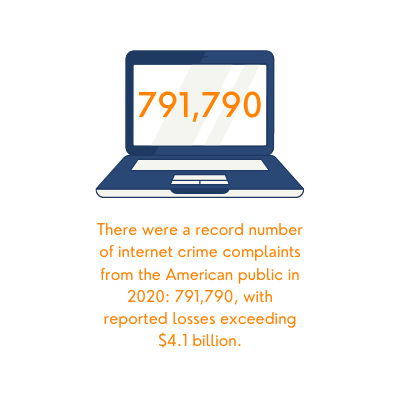
According to The Federal Bureau of Investigations’ Internet Crime Report, internet crime complaints reached 791,790, with reported losses exceeding $4.1 billion in 2020. Of those attacks, approximately 35,439 originated on social media, with adjusted losses of over $155 million.
 Some of the most prevalent attacks included:
- Phishing, vishing, smishing and pharming, with 241,342 complaints reported and adjusted losses of $54 million.
- Business email and email account compromise with 19,369 complaints reported and adjusted losses of $1.8 billion.
- Ransomware with 2,474 complaints reported and adjusted losses of $29.1 million.
“Unfortunately, cybercriminals are very opportunistic,” said FBI Section Chief Steven Merrill. “They see a vulnerable population out there that they can prey upon.”
To protect your businesses’ data, cybersecurity should always be top of mind. We encourage you to take extreme caution, especially when it comes to offers that are too good to be true. Always think before you click and, if you have doubts, verify the sender of an email.
Looking to boost your data protection? Contact Yeo & Yeo Technology to learn about our cybersecurity solutions.
Source: The Federal Bureau of Investigations’ 2020 Internet Crime Report
We’ve seen a shift in the industry from Endpoint Protection and Response (EDR) to Extended Detection and Response (XDR).
But does the naming really make a difference?
If you want to keep your data safe, the short answer is yes.
In general, EDR is different than XDR in that the “E” refers to endpoints specifically, whereas the “X” in XDR indicates it handles network and cloud data as well.
While the endpoint is a major target for cybercriminals and must be protected, each endpoint is only a component of an organization’s IT infrastructure. An enterprise network is composed of a large number of systems of varying types. Attempting to manage a diverse network infrastructure with point solutions can be complex and overwhelming to security teams.
Extended Detection and Response (XDR) is designed to simplify enterprise network security management. XDR solutions integrate security visibility across an organization’s entire infrastructure, including endpoints, cloud infrastructure, mobile devices and more. This single management platform simplifies security management and enforcement of consistent security policies across the enterprise.
EDR and XDR solutions are both designed to replace legacy, reactive approaches to cybersecurity. As a result, EDR and XDR solutions are similar in several ways, such as:
- Preventative Approach: EDR and XDR attempt to prevent security incidents by collecting in-depth data and applying data analytics and threat intelligence to identify threats before they occur.
- Rapid Threat Response: EDR and XDR both support automated threat detection and response. This enables an organization to minimize the cost, impact and damage caused by a cyberattack by preventing or rapidly remediating it.
- Threat Hunting Support: Threat hunting enables proactive security by allowing analysts to identify and remediate potential security issues before an attacker exploits them. EDR and XDR provide deep visibility and easy access to data, which aids threat hunting efforts.
As the endpoint becomes an increasingly vulnerable and vital component of an organization’s cybersecurity strategy, strong endpoint protection is a priority. However, this focus on the endpoint should not come at the cost of greater security complexity and a lack of visibility and security integration for the enterprise network as a whole.
Looking to boost your data protection? Contact Yeo & Yeo Technology to learn about our cybersecurity solutions.
Source: Check Point Software Technologies, LTD
2020 was full of change for the IT industry. Increased emphasis on remote working has resulted in new cybersecurity risks and software and hardware demands.
With the drama that last year brought about, lots of businesses like yours are cutting back and stretching their IT budgets further this year. Getting value for money from everything you do is essential.
That goes for your IT budget too.
Hopefully, you already realize that cutting back on your IT support spend is a very bad idea. One that is almost certain to cost you more money in the long run.
But there’s another element of your IT budget you may not have considered before: your devices, more specifically, whether it makes better financial sense to repair or replace a device when things start to go awry.
Yes, the outlay for a new device can be high. The outlay for a whole fleet of devices can be scary. But if your PC or laptop is getting towards the end of its life span, you will probably save more if you replace it than if you opt for trying to squeeze another year out of it.
Need Help With Strategic Technology Planning?
Yeo & Yeo Technology’s team of IT professionals is here to help you procure, implement, configure, and support technology products and services that maximize your total cost of ownership. We provide businesses throughout Michigan with fully managed computer hardware, software, and ergonomic procurement solutions. Contact us to learn more.
How should we dispose of old devices?
Never just throw your old devices away. First, ensure they are fully wiped of any data that may have once been stored on them. Then, if they are not fit for use, recycle them.
Can I retrieve a deleted email in Outlook?
If you’ve already checked your deleted folder and can’t find the email, click on ‘Recover deleted items.’ This will open a new window and display recently permanently deleted emails. Find the email in question and click ‘Recover.’
Why does my router keep prompting a reset?
With so many of us working from home, this has become more common. It’s usually because it’s overheating, or there are too many people using it. But it may also need replacing. Contact your internet provider if it’s happening regularly, and they may send you a new one.
As a result of the COVID-19 pandemic, your organization may have had to shift the way it does business, either by adopting mobile delivery models, accommodating staff with children at home, or embracing remote work as the new normal.
This may mean you have to transform the way you manage your customer relationships as well. As employees adapt to remote work, it becomes critical to have a central repository for files, a history of client interactions, and a means of communication internally across teams.
Putting Technology to Work
Technology-enabled remote work means that your customer won’t miss a beat just because your staff can’t make it to the office. With a good CRM system in place and appropriate processes, any colleague can easily pick up the relationship thread with the customer because you have their history logged into the system, with all details quickly accessible to anyone in your organization.
Creating a centralized, cloud-enabled location means that instant knowledge share is facilitated, with the added benefit of reducing customer wait times. All you need is an internet connection on a smart device or desktop to access notifications and pipelines.
Sage CRM offers more flexibility for your workforce and more benefits for your customers, it:
- Enables more informed communication between your staff and customers based upon a knowledge of their history with your organization
- Allows for the successful collection of information about customers, which streamlines a better understanding of their needs now and what they may ask for in the future
- Eases efficient handling of tasks in-line with overall company goals or objectives
- Provides seamless analytics and reporting on outputs or campaigns
As we head into the new working normal, strengthening and adding flexibility to your business operations will empower your organization and people to serve your customers better no matter what.
Want to learn more about our Sage CRM solution? Contact Yeo & Yeo Technology.
Information used in this article was provided by our partners at Sage.
“People are our most important asset.” You’ve heard that a million times. And, it’s true. How long can you survive if that vital resource is inadvertently allowed to become detached, devalued, and departed? Answer: Not very long. Preventing that outcome requires monitoring critical workforce trends and responding accordingly.
Here are five common workforce trends and their implications for your business.
Trend #1: Rise of remote working
COVID has put remote working and collaborative technology at the forefront of business processes and planning. Although the day will come when companies can once again welcome their full staff back into the office, many professionals expect remote working to remain more common than before.
Trend #2: Regulatory uncertainty
As the world deals with unprecedented changes brought on by COVID-19, regulatory uncertainty is at an all-time high. With the regulatory environment in a state of flux, employers have to take extra care to avoid running afoul of employment laws and incurring substantial penalties.
Trend #3: Multi-generation workforce
Members of each generation typically have different perspectives on work both because of their age and the formative experiences of their early adulthood. Distinct generational characteristics are often overstated but nevertheless result in age-based demographic diversity that must be considered to run a business optimally.
Trend #4: Reliance on contingent workers
The dynamic business climate has employers seeking greater workforce management flexibility, which is often achieved by hiring contingent or temporary workers. However, the practice is accompanied by different management, collaboration, and regulatory challenges compared to salaried workers.
Trend #5: Digital disruption in the workforce
As information technology grows ever more sophisticated, employees are forced to become computer technicians to hold down jobs that previously required a different set of skills. Such sweeping changes place new demands on workers and managers alike.
Responding to workforce trends
Consider the following HR functions: attendance and leave management, payroll, compensation, benefits, and talent acquisition. When the technology used to administer those HR functions is integrated, you’re better equipped to streamline workflows, make better decisions, improve compliance, and stay on top of workforce trends.
Looking to implement an integrated HR solution? Contact Yeo & Yeo Technology. Our Sage HRMS solution is a single source for flawless payroll processing, employee administration, registration, analysis, employee life-cycle management, and all other crucial employee-related information.
Information used in this article was provided by our partners at Sage.