How to Use AI to Eliminate Repetitive Work, Save Time, and Boost Productivity Across the Business
Most people think of Microsoft Copilot as a handy writing or summarizing tool. That’s a great start, but it’s only scratching the surface. The next level of AI in the workplace is here, and it’s called a Copilot Agent.
These digital assistants don’t just answer questions; they perform tasks, follow multi-step instructions, and can even support your departments like a real team member would. Imagine automating a 10-step invoice approval process. Or onboarding a new hire. Or prepping weekly sales reports without lifting a finger. A Copilot Agent can do that, and businesses that embrace them now are setting themselves up for a major productivity leap.
What Is a Copilot Agent?
A Copilot Agent is like a supercharged version of Copilot that’s built to handle automated, repeatable workflows. It goes beyond simple prompts. It’s designed to:
Collect and analyze information from different sources
Take action based on defined rules
Communicate with your apps, documents, and systems
Deliver outcomes without human intervention
Think of it as a trained digital assistant that follows instructions consistently, 24/7—without ever needing a coffee break.
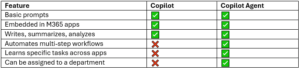
What’s the Difference Between Copilot and a Copilot Agent?
Examples of Copilot Agents in the Wild
Here are just a few use cases showing how departments can benefit from Copilot Agents:
1. Finance & Accounting: Invoice Approver Agent
Monitors inbox for incoming invoices
Matches invoice to PO and project code
Sends approval requests to managers
Logs approved payments into the accounting system
Result: Faster payment cycles, fewer human errors
2. HR: New Hire Onboarding Agent
Sends welcome email + login info
Shares employee handbook and benefits forms
Schedules first-week meetings
Notifies IT to set up equipment
Result: A consistent, stress-free onboarding experience for every new hire
3. Sales: Weekly Pipeline Reporting Agent
Pulls data from CRM and Excel sheets
Summarizes open deals and forecasts
Prepares a PowerPoint deck
Sends it to the sales team every Friday
Result: No more end-of-week scramble
4. Operations: Vendor Management Agent
Tracks contract expiration dates
Sends reminders to procurement
Flags compliance risks
Suggests renewal options based on usage
Result: Better vendor control and fewer missed deadlines
Are They Safe?
Yes, if configured correctly. Copilot Agents operate within the security boundaries of your Microsoft 365 environment. That means they only access what you’ve given them permission to access. Still, governance is key:
Set up proper data access controls
Review what agents can and can’t do
Monitor performance and update regularly
Yeo & Yeo Technology’s specialists help ensure that every Copilot Agent is configured securely and aligned with your business needs.
How Do You Build One?
Watch our on-demand webinar on how to design and build your first Copilot Agent. This video explains the business logic, the Microsoft 365 tools you need, and how to scale agents across your departments.
Final Thoughts
Copilot is great, but Copilot Agents are transformative. They give your business the power to reduce manual work, improve consistency, and help every department operate more efficiently. It’s not just about automation. It’s about giving your team the freedom to focus on what they do best, while the digital assistants handle the rest.